
等边三角形、正方形和正六边形镶嵌的可变动画
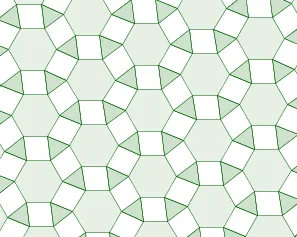
几何画板及绘图内容加载中,请稍等……
①本范例演示了等边三角形、正方形和正六边形如何进行平面镶嵌,并通过滑块动画展示其动态变化过程;②涉及的核心数学概念包括多边形镶嵌、几何变换、角度计算、向量运算等;③作图要点提炼自构造摘要,使用了Point, Intersect, Polygon, Circle, Rotate, Line, Vector, Sequence, Angle等GeoGebra命令和对象;④适合高中数学教学,用于直观展示几何图形的变换与组合规律,加深学生对多边形性质和镶嵌原理的理解。
GeoGebra 命令及参数
Point(xAxis) → BIntersect(xAxis, yAxis) → OOPolygon(OO, B, 6) → poly1, b, F, c, d, e, f, g, C, D, ECircle(C, B) → pCircle(OO, B) → hIntersect(p, h) → I, J, ,Rotate(I, (-rot), OO) → I'Polygon(A, OO, 3) → poly2, i, j, k, HRotate(poly2, α, J) → poly2'Rotate(poly2', α, J) → poly2''Rotate(poly2'', α, J) → poly2'''Rotate(poly2''', α, J) → poly3Rotate(poly3, α, J) → poly3'Line(OO, B) → aRotate(H, α, J) → H'Vector(E, A) → uSequence(Translate[ListPoly, Vector[(n * u)]], n, (-k2), k2) → ListRow1Vector(H, C) → vSequence(Translate[ListRow1, Vector[(n * v)]], n, (-k2), k2) → ListGridAngle(A, OO, B) → βAngle(A, OO, B) → γ