
骨骼立方体——菱形十二面体折纸动画
几何画板及绘图内容加载中,请稍等……
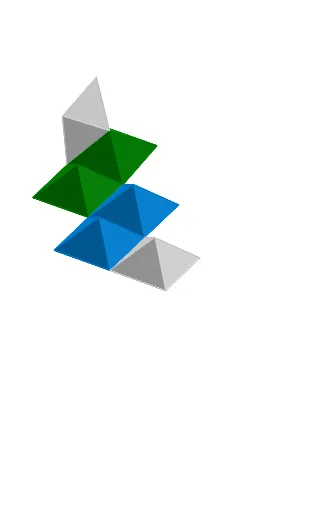
① 该范例演示了一个由纸张折叠而成的“骨骼立方体”模型,其展开形态为菱形十二面体,并通过动画展示其折叠与展开的动态过程。② 核心数学概念涉及立体几何中的多面体(菱形十二面体)、空间变换(旋转与平移)以及参数化动画控制,同时隐含了对称性与拓扑结构。③ 作图要点:从构造摘要可见,使用了Point、Line、PolyLine、Segment、OrthogonalLine、Intersect、If、Plane、Polygon、Rotate、IntersectPath、RoofPoly2等GeoGebra命令,并创建了shift、K_1、T、S、m、g_1、D_2、h_1、Z_1、D_4、E_2、B_2、C_2、A_2、t、clock、rot1s、D、C、cc、A、C_1、B_1、A_1、Z、W、V、p、constClock、U、n、A1、rot1a、constSingle、rot0、bControl、rot1、J_1、I_1、G_1等对象,通过滑块(如rot1、rot0)和时钟(clock)控制旋转动画。④ 适合中学高年级至大学低年级的立体几何教学,也可用于折纸数学或动态几何演示,帮助学生直观理解多面体的空间结构与变换。
GeoGebra 命令及参数
Point(xAxis) → SLine(S, T) → mLine(K_1, m) → g_1Line(D_2, m) → h_1Point(h_1) → B_2Point(h_1) → C_2Point(g_1) → A_2PolyLine(Z_1, A_2, B_2, C_2, D_4, E_2) → tSegment(C, D) → ccPoint(h_1) → A_1Point(h_1) → ZPoint(g_1) → WPolyLine(V, W, Z, A_1, B_1, C_1) → pOrthogonalLine(U, m) → nIntersect(n, p) → A1If(bControl ≟ constSingle, rot0, If[bControl ≟ constClock, rot1a, rot1s]) → rot1Point(h_1) → G_1Point(g_1) → F_1Point(t) → H_1PolyLine(E_1, F_1, G_1, H_1, I_1, J_1) → qIntersect(n, q) → A2Point(h_1) → O_1Point(h_1) → N_1Point(g_1) → M_1PolyLine(L_1, M_1, N_1, O_1, P_1, Q_1) → rIntersect(n, r) → A3Point(h_1) → U_1Point(h_1) → T_1Point(g_1) → S_1PolyLine(R_1, S_1, T_1, U_1, V_1, W_1) → sIntersect(n, s) → A4Intersect(n, t) → A5Segment(D, A) → ddPlane(B, C, D) → eSegment(A, B) → aaSegment(B, C) → bbIf(bControl ≟ constSingle, rot0, If[bControl ≟ constClock, rot4a, rot4s]) → rot4Polygon(A, B, C, D) → poly1, a, b, c, dRotate(B, (-rot1), cc) → B'Rotate(C, (-rot1), cc) → C'Rotate(D, (-rot1), cc) → D'Rotate(A, (-rot1), cc) → A'Polygon(A', B', C', D') → poly1', a', b', c', d'If(bControl ≟ constSingle, rot0, If[bControl ≟ constClock, rot2a, rot2s]) → rot2Rotate(poly1', rot2, b') → poly1''Rotate(D', rot2, b') → D''Rotate(A', rot2, b') → A''Segment(B', A'') → fIf(bControl ≟ constSingle, rot0, If[bControl ≟ constClock, rot3a, rot3s]) → rot3Rotate(poly1'', rot3, f) → poly1'''Rotate(D'', rot3, f) → D'''Rotate(C', rot3, f) → C'''Segment(A'', D''') → gRotate(poly1''', (-rot4), g) → poly2Rotate(C''', (-rot4), g) → C''''Rotate(B', (-rot4), g) → B'''Segment(D''', C'''') → hIf(bControl ≟ constSingle, rot0, If[bControl ≟ constClock, rot5a, rot5s]) → rot5Rotate(A'', rot5, h) → A'''Rotate(B''', rot5, h) → B''''Rotate(e, gable, dd) → e'_3Rotate(e, (-roof), aa) → e'_1IntersectPath(e'_3, e'_1) → iRotate(e, gable, bb) → e'IntersectPath(e', e'_1) → jRotate(e, (-roof), cc) → e'_2IntersectPath(e'_3, e'_2) → kIntersectPath(e', e'_2) → lIntersect(l, k) → EIntersect(j, i) → FRoofPoly2(A, B, C, D, gable, roof) → G, H, poly3, poly4, poly5, poly6, poly7RoofPoly2(A', D, C, B', gable, roof) → I, J, poly8, poly9, poly10, poly11, poly12RoofPoly2(C''', B', A'', D''', gable, roof) → K, L, poly13, poly14, poly15, poly16, poly17RoofPoly2(A''', D''', C'''', B'''', gable, roof) → M, N, poly18, poly19, poly20, poly21, poly22RoofPoly2(C, D'', A'', B', gable, roof) → O, P, poly23, poly24, poly25, poly26, poly27RoofPoly2(A'', B''', C'''', D''', gable, roof) → Q, R, poly28, poly29, poly30, poly31, poly32Line(D_1, m) → f_1
AI 绘图提示语参考
绘制一个由菱形十二面体展开而成的“骨架立方体”折纸模型,并展示其折叠与展开的动画过程。图形包含一个立方体框架,其表面由多个菱形面组成,通过旋转和移动实现折叠。画面中可见多条辅助线、交点以及控制动画的滑块。整体呈现三维立体几何结构,强调对称性与空间变换,适合用于教学演示。
以上提示语为根据原始绘图命令整理而来,仅供参考。