
Petrie–Coxeter 蜂巢折纸动画
几何画板及绘图内容加载中,请稍等……
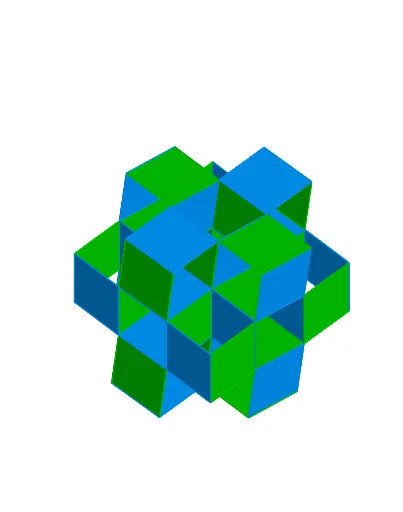
该范例演示了由纸张折叠而成的 Petrie–Coxeter 蜂巢结构的三维动画模型,展示了正多面体在三维空间中的周期性排列。核心数学概念涉及立体几何中的多面体、对称性、平移与旋转,以及空间镶嵌(tessellation)。作图要点包括:使用 GeoGebra 的 Point、Circle、Line、OrthogonalLine、Intersect 等命令构建基础几何元素,通过 Rotate、Polygon、Vector、Translate 实现旋转和平移操作,利用 Plane、Sphere、IntersectConic、OrthogonalPlane 构造三维空间中的平面与曲面,并借助 Angle、Slider 等控制动画参数。该范例适合高中及以上学段的学生或数学爱好者,用于理解多面体镶嵌、空间对称性以及参数化动画的构造方法。
GeoGebra 命令及参数
Point(yAxis) → OOOCircle(OOO, Z) → c_2Line(OOO, Z) → i_2OrthogonalLine(OOO, i_2) → j_2Intersect(c_2, j_2, 2) → B_1Rotate(B_1, 120°, OOO) → C_1Rotate(B_1, (-(120°)), OOO) → D_1Polygon(C_1, D_1, B_1) → poly10, b_2, c_3, d_2PointIn(poly10) → E_1OrthogonalLine(E_1, d_2) → m_2Intersect(m_2, d_2) → I_1Segment(E_1, I_1) → p_2Intersect(b_2, j_2) → J_1Segment(B_1, J_1) → r_2OrthogonalLine(E_1, b_2) → k_2Intersect(k_2, poly10) → F_1, G_1Segment(E_1, F_1) → n_2OrthogonalLine(E_1, c_3) → l_2Intersect(l_2, c_3) → H_1Segment(E_1, H_1) → q_2If(control ≟ constSlider, β_1, If[control ≟ constTriad, β_2, β_3]) → βIf(control ≟ constSlider, α_1, If[control ≟ constTriad, α_2, α_3]) → αRotate(B, α, A) → B'Vector(A, B') → vVector(A, B) → uTranslate(B', u) → B''Vector(A, B'') → w_1Translate(A, w_1) → A'Polygon(A, B, B'', B') → poly1, a_1, b_1, b'', b'OrthogonalLine(B', poly1) → gPoint(g) → DPlane(A, B', D) → dPolygon(B', A, 4, d) → poly2, h, i, j, k, G, HTranslate(G, u) → G'Translate(G', v) → G''_2Plane(G, G', A) → ePolygon(A, G, 4, e) → poly3, l, m, n, p, I, JLine(J, A') → qRotate(G', β, q) → G''Vector(J, G'') → wTranslate(A', w) → A''Translate(A'', u) → A'''Line(A''', A'') → m_1Translate(G', w) → G''_1Translate(G'', u) → G'''Plane(G'', G''', G''_1) → oPolygon(G'', G''', 4, o) → poly5, s, t, f_1, g_1, K, LTranslate(L, v) → L'Vector(L', G''_1) → v_2If(control ≟ constSlider, γ_1, If[control ≟ constTriad, γ_2, γ_3]) → γRotate(L', γ, m_1) → L''_1Vector(G'', L''_1) → v_1Translate(K, d_1) → K'Translate(G''_1, d_1) → QPlane(L', Q, K') → n_1Polygon(L', Q, 4, n_1) → poly8, p_1, q_1, r_1, s_1, S, TVector(T, L') → u_2Rotate(L', (-β), r_1) → L''_2Translate(L''_2, u_2) → K_1Plane(G''_2, L', K_1) → o_2Polygon(G''_2, L', 4, o_2) → poly13, h_3, i_3, j_3, k_3, N_1, O_1Translate(poly13, v_2) → poly6Translate(N_1, v_2) → R_1Line(G''_1, R_1) → t_1Translate(poly2, u) → poly2'Rotate(poly2', β, q) → poly2''Vector(A, G) → rPlane(R_1, N_1, O_1) → w_2Polygon(R_1, N_1, 4, w_2) → poly15, m_3, n_3, p_3, q_3, P_1, Q_1Vector(Q_1, G') → u_3Translate(poly13, v_2) → poly13'Line(G', G''_1) → h_1Circle(A, B, xOyPlane) → cPoint(zAxis) → CPlane(A, B'', C) → aIntersect(yAxis, zAxis) → FPlane(A, B, C) → bOrthogonalLine(A, b) → fIntersect(g, c, 1) → ETranslate(poly3, v) → poly3'Translate(poly2', w) → poly2''_1Translate(poly2'', r) → poly2'''Translate(poly2''_1, u) → poly4Translate(poly5, v) → poly5'Translate(poly6, v) → poly6'Polygon(R_1, N_1, 4, w_2) → poly7, i_1, j_1, k_1, l_1, N, OTranslate(poly2'', u_3) → poly2'''_1Vector(Q_1, B) → u_1Translate(poly6, u_1) → poly6'_1Translate(poly6', u_1) → poly6''Translate({poly2, poly2', poly2''_1, poly4, poly6, poly6', poly6'', poly6'_1}, Vector[A, A]) → listPoly1Translate({poly2'', poly2''', poly2'''_1, poly3, poly3', poly5, poly5', poly7}, Vector[A, A]) → listPoly2Point(c) → PRotate(poly5', γ, m_1) → poly5''Translate(poly8, Vector[(-r)]) → poly8'Intersect(c_2, i_2, 2) → A_1Rotate(poly8, (-β), r_1) → poly8'_1Translate(poly8'_1, u_2) → poly11Line(G', G''_1) → l_3Translate(poly2'', u_3) → poly2'''_2Translate({poly2, poly2', poly2''_1, poly4}, Vector[A, A]) → listPoly311_1Translate({poly2'', poly2''', poly3, poly3', poly5, poly5'}, Vector[A, A]) → listPoly311_2Translate({poly2, poly2', poly2''_1, poly4, poly13, poly6, poly6'', poly6'_1}, Vector[A, A]) → listPoly331_1Translate({poly2'', poly2''', poly2'''_1, poly3, poly3', poly5, poly5', poly7}, Vector[A, A]) → listPoly331_2Point(listPoly331_1) → MRotate(poly6, δ, t_1) → poly6'_2Line(G''_1, K) → c_1Rotate(poly5, ε, c_1) → poly5'_1Rotate(G''', ε, c_1) → RRotate(Q_1, δ, t_1) → URotate(G', δ, t_1) → G''_3Rotate(G'', ε, c_1) → G'''_1Sphere(R_1, G') → e_1Sphere(K, G'') → o_1IntersectConic(e_1, o_1) → e_2OrthogonalLine(G''_1, t_1, space) → f_2OrthogonalPlane(G''_1, t_1) → a_2Intersect(a_2, e_2) → V, L_1Angle(G', G''_1, L_1) → ζRotate(poly6, ζ, t_1) → poly6'_3Plane(G''_1, G'', L_1) → g_2Angle(L_1, L, G'') → ηLine(L, K) → h_2Rotate(poly5, (-η), h_2) → poly5'_2Vector(L', L_1) → s_2Translate(listPoly1, s_2) → listPoly1'Translate(listPoly2, s_2) → listPoly2'Translate(poly5'_2, Vector[(-r)]) → poly9Translate(poly6'_3, Vector[(-w)]) → poly12Translate(poly5'_2, Vector[(-w)]) → poly16Translate(poly16, u_2) → poly16'Translate(poly16', Vector[(-r)]) → poly16''Translate(Translate[poly6'_3, u_3], Vector[(-r)]) → poly17Translate(Translate[poly12, u_3], Vector[(-r)]) → poly18Translate(poly6'_3, Vector[(-u_2)]) → poly19Translate(poly17, Vector[(-u_2)]) → poly17'Translate(poly5'_2, Vector[(-u_3)]) → poly20Translate(poly16', Vector[(-u_3)]) → poly16''_1Translate(poly12, w) → poly12'Translate(poly9, u_3) → poly9'Translate(poly16'', u_3) → poly16'''Translate(poly12, u_2) → poly12'_1Translate(poly18, u_2) → poly18'
AI 绘图提示语参考
绘制一个三维动画折纸模型,展示Petrie–Coxeter蜂巢结构。首先在竖直轴上取一点作为中心,画一个圆和一条过中心的竖直线,再作其垂线,与圆交于一点,将该点绕中心旋转120度和负120度得到另外两点,连接三点构成一个等边三角形。在三角形内取一点,作该点到各边的垂线,并标记垂足。随后构建一个由四个顶点组成的平行四边形,并以其为基面,通过平移和旋转生成多个相邻的平行四边形,形成空间周期性排列。用滑块控制旋转角度和模式,使整个结构动态折叠展开,体现多面体在空间中的对称镶嵌。
以上提示语为根据原始绘图命令整理而来,仅供参考。