
单位圆与三角函数 by Craig Cullen
几何画板及绘图内容加载中,请稍等……
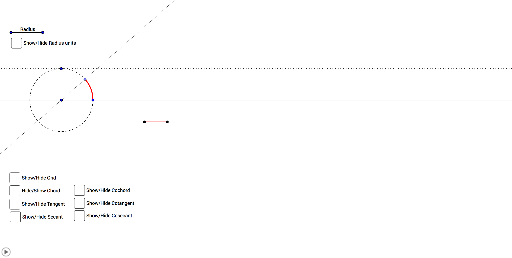
①本范例演示单位圆上六种三角函数的几何表示;②涉及核心数学概念包括单位圆、三角函数、几何对象、角度与弧;③作图要点提炼自 GeoGebra 命令:向量、平移、射线、点、线段、圆、圆弧、直线、垂线、交点、旋转、镜像;④适合高中数学教学与学习,用于直观理解三角函数与单位圆的关系。
GeoGebra 命令及参数
Vector((0, 0), (1, 0)) → vTranslate(A, v) → A'Ray(A, A') → aPoint(a) → BSegment(A, B) → bVector(A, B) → RadiusTranslate(C, Radius) → C'Circle(C, C') → cPoint(c) → DCircleArc(C, C', D) → dLine(C, C') → eOrthogonalLine(D, e) → fIntersect(f, e) → ESegment(D, E) → gPoint(Circle[F, abs(d)]) → GSegment(F, G) → hVector(E, D) → Chord_1OrthogonalLine(F, Radius) → iTranslate(i, Radius) → i'Translate(i', Radius) → i''Translate(i'', Radius) → i'''Translate(i''', Radius) → jTranslate(j, Radius) → j'Translate(j', Radius) → j''Translate(G, Chord_1) → G'Segment(G', G) → kIntersect(i', h) → HIntersect(i'', h) → IIntersect(i''', h) → JIntersect(j, h) → KIntersect(j', h) → LIntersect(j'', h) → MRotate(B, 90°, A) → B'Translate(A, Radius) → A'_1Vector(A, A'_1) → uVector(A, B') → wRay(F, G) → mTranslate(F, w) → F'Translate(G, w) → G'_1Ray(F', G'_1) → m'Translate(F', w) → F''Translate(G'_1, w) → NRay(F'', N) → m''Translate(F'', w) → F'''Translate(N, w) → N'Ray(F''', N') → m'''Mirror(F''', m) → OMirror(N', m) → N''Ray(O, N'') → nMirror(F'', m) → F'''_1Mirror(N, m) → N'_1Ray(F'''_1, N'_1) → m'''_1Mirror(F', m) → F''_1Mirror(G'_1, m) → PRay(F''_1, P) → m''_1OrthogonalLine(C', m') → lLine(C, D) → pIntersect(l, p) → QSegment(Q, C') → rVector(C', Q) → TangentTranslate(G, Tangent) → G'_2Segment(G'_2, G) → tIntersect(l, p) → RSegment(R, C) → a_1Point(a_1) → SVector(C, R) → SecantLine(C, C') → b_1OrthogonalLine(D, Secant) → c_1Intersect(b_1, c_1) → TVector(C, T) → Secant_2Translate(G, Secant_2) → G'_3Rotate(G'_3, 90°, G) → USegment(G, U) → d_1Segment(C, T) → e_1Ray(C, C') → g_1Rotate(C, 57.29577951308232°, C) → C'_1Rotate(C', 57.29577951308232°, C) → C''Ray(C'_1, C'') → h_1Intersect(d, h_1) → V,Rotate(C'_1, 57.29577951308232°, C) → WRotate(C'', 57.29577951308232°, C) → C'''Ray(W, C''') → i_1Rotate(W, 57.29577951308232°, C) → W'Rotate(C''', 57.29577951308232°, C) → ZRay(W', Z) → j_1Rotate(W', 57.29577951308232°, C) → W''Rotate(Z, 57.29577951308232°, C) → Z'Ray(W'', Z') → k_1Rotate(W'', 57.29577951308232°, C) → W'''Rotate(Z', 57.29577951308232°, C) → Z''Ray(W''', Z'') → l_1Rotate(W''', 57.29577951308232°, C) → A_1Rotate(Z'', 57.29577951308232°, C) → Z'''Ray(A_1, Z''') → m_1Intersect(d, i_1, 1) → B_1Intersect(d, j_1, 1) → C_1Intersect(d, k_1, 1) → D_1Intersect(d, l_1, 1) → E_1Intersect(d, m_1, 1) → F_1Line(D, b) → p_1OrthogonalLine(C, p_1) → q_1Intersect(p_1, q_1) → G_1Segment(D, G_1) → r_1Vector(G_1, D) → CochordTranslate(G, Cochord) → G'_4Rotate(G'_4, 90°, G) → H_1Segment(H_1, G) → s_1Rotate(C', 90°, C) → C''_1OrthogonalLine(C''_1, l) → t_1Intersect(p, t_1) → I_1Segment(C''_1, I_1) → a_2Vector(C''_1, I_1) → CotangentTranslate(G, Cotangent) → G'_5Rotate(G'_5, 90°, G) → J_1Segment(J_1, G) → b_2Line(C, C') → c_2Intersect(p, t_1) → K_1Segment(C, K_1) → d_2Line(C, C''_1) → e_2OrthogonalLine(D, d_2) → f_2Intersect(e_2, f_2) → L_1Segment(C, L_1) → g_2Vector(C, L_1) → CosecantTranslate(G, Cosecant) → G'_6Segment(G, G'_6) → h_2
AI 绘图提示语参考
绘制单位圆,并在圆上标出正弦、余弦、正切、余切、正割和余割函数的几何意义。首先画出单位圆,然后通过点A和圆心C画出半径,接着在圆上取点B,连接AB得到半径。通过B点画出与x轴正方向的射线,再在圆上取点D,连接CD得到圆弧。通过D点画出与射线垂直的直线,与x轴交于E点,连接DE。接下来构造正弦线、余弦线、正切线、余切线、正割线和余割线,最后通过镜像操作得到正割线和余割线的对应线段。
以上提示语为根据原始绘图命令整理而来,仅供参考。