
对称与旋转折叠
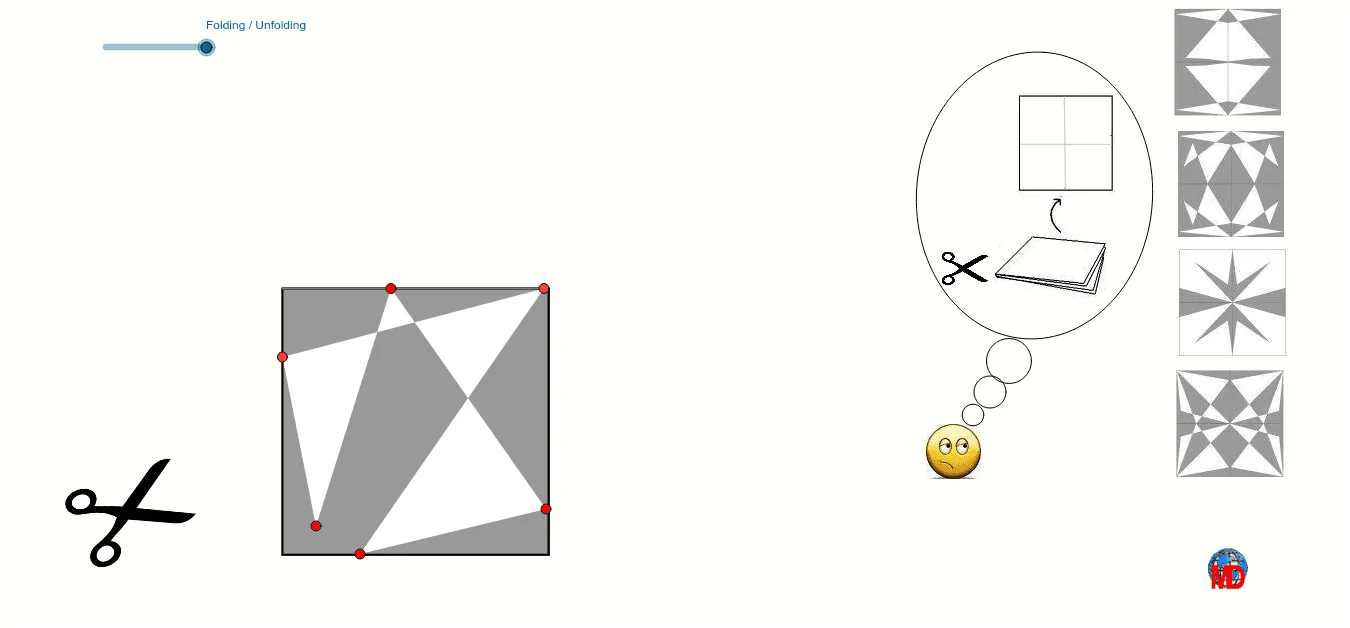
几何画板及绘图内容加载中,请稍等……
这个范例演示了对称与旋转的折叠过程。核心数学概念包括对称、旋转和变换。通过使用GeoGebra命令如Polygon、Mirror、Rotate等,可以构造出复杂的几何图形。适合中学阶段的学生和教师使用,帮助理解几何变换的基本原理。
GeoGebra 命令及参数
Polygon((0, -4), (4, -4), (4, 0), (0, 0)) → poly1, a, b, c, dMirror((0, 0), b) → HMirror((4, 0), b) → GMirror((4, -4), b) → FMirror((0, -4), b) → EPolygon(E, F, G, H) → poly2, e, f, g, hMirror(M, f) → M'_1Mirror(M'_1, g) → M''Mirror(P4, f) → P4'_3Mirror(P4'_3, g) → P4''Mirror(P3, f) → P3'_2Mirror(P3'_2, g) → P3''Mirror(P1, f) → P1'_1Mirror(P1'_1, g) → P1''Mirror(P2, f) → P2'_2Mirror(P2'_2, g) → P2''Mirror(N, f) → N'_1Mirror(N'_1, g) → N''Mirror(M, c) → M'Mirror(N, c) → N'Polygon(P1, P2, P3, P4, M, N) → polyhex1, i, l, m, n, p, qRotate(P4, (((-plein) * 180))°, (4, y(P4))) → P4'_1Rotate((0, 0), (((-plein) * 180))°, (4, 0)) → ARotate((0, -4), (((-plein) * 180))°, (4, -4)) → BIntersect(b, c) → CIntersect(b, a) → DPolygon(D, B, A, C) → poly1', d_1, b_1, a_1, c_1Mirror(P2, b) → P2'_1Mirror(P3, b) → P3'_1Mirror(P4, b) → P4'_2Intersect(a, d) → IRotate(P1, (((plein - 1) * 180))°, (x(P1), 0)) → P11Rotate(P2, (((plein - 1) * 180))°, (x(P2), 0)) → P21Rotate(P4, (((plein - 1) * 180))°, (x(P4), 0)) → P41Rotate(P2'_1, (((plein - 1) * 180))°, (x(P2'_1), 0)) → P22Rotate(P4'_2, (((plein - 1) * 180))°, (x(P4'_2), 0)) → P42Rotate((0, -4), (((plein - 1) * 180))°, (0, 0)) → JRotate((4, -4), (((plein - 1) * 180))°, (4, 0)) → J2Rotate((8, -4), (((plein - 1) * 180))°, (8, 0)) → J3Intersect(c, d) → KPolygon(K, J, J2, G) → poly3, k, j, j2, g_1Polygon(P1'_1, P2'_2, P3'_2, P4'_3, M'_1, N'_1) → polyhex4, r, s, t, e_1, f_1, i_1Polygon(J3, H, G, J2) → poly4, j3, h_1, g_2, j2_1Polygon(P1'', P2'', P3'', P4'', M'', N'') → polyhex3, j_1, k_1, l_1, m_1, n_1, p_1Mirror(P1, c) → P1'Mirror(P2, c) → P2'Mirror(P3, c) → P3'Mirror(P4, c) → P4'Polygon(P1', P2', P3', P4', M', N') → polyhex2, q_1, r_1, s_1, t_1, a_2, b_2Segment(M, P4) → c_2Midpoint(c_2) → OMidpoint(P4, O) → PCircle(S, T) → d_2Circle(U, V) → e_2Circle(W, Z) → f_2Ellipse(A_1, B_1, C_1) → h_2