
薯片模型:双曲抛物面
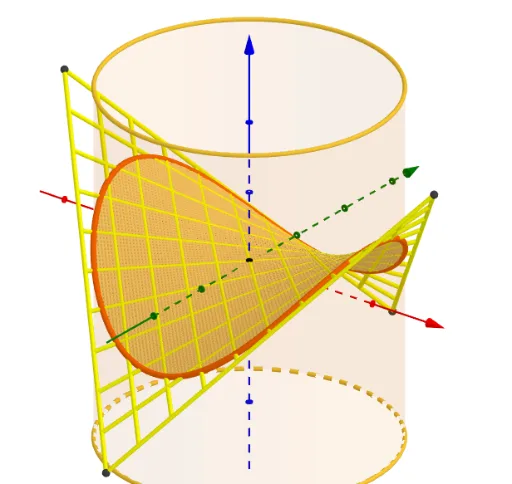
几何画板及绘图内容加载中,请稍等……
①本范例演示如何用双曲抛物面模拟薯片形状;②涉及核心数学概念包括双曲抛物面、参数方程、空间曲面、解析几何;③作图要点:运用了Intersect, IntersectConic, Point, Rotate, OrthogonalLine, Locus, Circle, Cylinder, CurveCartesian, Polygon, Sequence, Segment等GeoGebra命令与对象;④适合高中及以上学生及空间几何爱好者学习曲面建模。
GeoGebra 命令及参数
Intersect(xAxis, yAxis) → AIntersectConic(g, eq1) → cIntersectConic(eq1, g) → dPoint(xAxis) → BRotate(B, (e * 360°)) → B'OrthogonalLine(B', xOyPlane) → iIntersect(i, g) → C,Locus(C, e) → lieu1Locus(C, e) → lieu2Circle(A, B) → kPoint(zAxis) → DPoint(zAxis) → ECylinder(D, E, 2) → j, p, q, lIntersectConic(g, l) → rIntersectConic(z = x^(2) / a^(2) - y^(2) / a^(2), x^(2) + y^(2) + (0 * z) = 4) → sCurveCartesian(((2 * cos(t)), (2 * sin(t)), pr((2 * cos(t)), (2 * sin(t)))), t, 0, (2 * 3.141592653589793)) → mPoint(xAxis) → FPolygon(F, G, 4) → poly1, n, t, f_1, g_1, H, IPolygon(J, K, L, M) → q1, j_1, k_1, l_1, m_1Sequence(Segment[L + (k * (K - L)), M + (k * (J - M))], k, 0, 1, 0.1) → l1Sequence(Segment[K + (k * (J - K)), L + (k * (M - L))], k, 0, 1, 0.1) → l2Segment(L + (e * (K - L)), M + (e * (J - M))) → h_1Segment(Intersect[Segment[L + (e * (K - L)), M + (e * (J - M))], l, 1], Intersect[Segment[L + (e * (K - L)), M + (e * (J - M))], l, 2]) → i_1Sequence(Segment[Intersect[Segment[L + (ee * (K - L)), M + (ee * (J - M))], l, 1], Intersect[Segment[L + (ee * (K - L)), M + (ee * (J - M))], l, 2]], ee, 0, e, 0.01) → l3Rotate(Mirror[l3, xOyPlane], 90°) → l4Segment(Intersect[Segment[M + (e * (L - M)), J + (e * (K - J))], l, 1], Intersect[Segment[M + (e * (L - M)), J + (e * (K - J))], l, 2]) → n_1Segment(Intersect[Segment[M + ((1 - e) * (L - M)), J + ((1 - e) * (K - J))], l, 1], Intersect[Segment[M + ((1 - e) * (L - M)), J + ((1 - e) * (K - J))], l, 2]) → p_1
AI 绘图提示语参考
在三维坐标系中建立一张双曲抛物面并以其为母线曲面来建模“Pringles”形状。先取 x 轴与 y 轴的交点作关键参考点,再在竖直方向做旋转与垂足投影,得到与曲面相交的空间曲线所需的若干点。随后通过这些点构造与曲面相关的圆与圆锥截交,生成曲面上的交线。用参数方程在空间中绘制双曲抛物面(以 x、y 为自变量并令 z 由差平方形式给出),再沿由截交得到的方向取样画出弯曲边界的分段线段,并对称/镜像得到另一侧轮廓,最终形成类似薯片的上下对称曲面与边界曲线。
以上提示语为根据原始绘图命令整理而来,仅供参考。