
乘法可视化工具
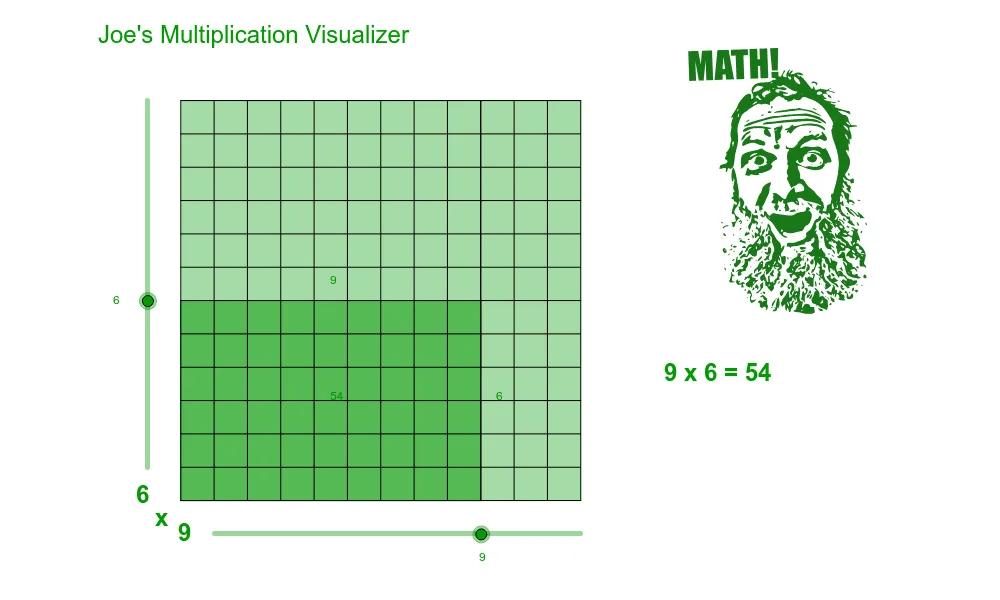
几何画板及绘图内容加载中,请稍等……
这是一个类似于其他乘法可视化工具的示例。它通过几何画板帮助用户直观理解乘法运算。核心数学概念包括函数和几何构造。使用了Intersect, Line, OrthogonalLine, Polygon, Segment等命令。适合小学高年级和初中学生学习乘法和几何。
GeoGebra 命令及参数
Intersect(xAxis, yAxis) → originLine(origin, xAxis) → y_0Line(origin, yAxis) → yaxisOrthogonalLine(xfactor1, y_0) → factor1lineOrthogonalLine(yfactor2, yaxis) → factor2lineIntersect(factor1line, factor2line) → xyfactorsPolygon(origin, xfactor1, xyfactors, yfactor2) → poly1, origin_1, xfactor1_1, xyfactors_1, yfactor2_1Intersect(yaxis, y_{12}) → AIntersect(yaxis, y_{11}) → BIntersect(yaxis, y_{10}) → CIntersect(yaxis, y_9) → DIntersect(yaxis, y_8) → EIntersect(yaxis, y_7) → FIntersect(yaxis, y_6) → GIntersect(yaxis, y_5) → HIntersect(yaxis, y_4) → IIntersect(yaxis, y_3) → JIntersect(yaxis, y_2) → KIntersect(yaxis, y_1) → LIntersect(y_{12}, x_{12}) → MIntersect(y_{11}, x_{12}) → NIntersect(y_{10}, x_{12}) → OIntersect(y_9, x_{12}) → PIntersect(y_8, x_{12}) → QIntersect(y_7, x_{12}) → RIntersect(y_6, x_{12}) → SIntersect(y_5, x_{12}) → TIntersect(y_4, x_{12}) → UIntersect(factor2line, y_3) → VIntersect(factor2line, y_3) → WIntersect(factor2line, y_3) → ZIntersect(y_2, x_{12}) → A_1Intersect(y_1, x_{12}) → B_1Intersect(y_3, x_{12}) → C_1Intersect(y_{12}, x_1) → D_1Intersect(y_{12}, x_2) → E_1Intersect(factor1line, y_{12}) → F_1Intersect(y_{12}, x_4) → G_1Intersect(y_{12}, x_5) → H_1Intersect(y_{12}, x_6) → I_1Intersect(y_{12}, x_7) → J_1Intersect(y_{12}, x_8) → K_1Intersect(y_{12}, x_9) → L_1Intersect(y_{12}, x_{10}) → M_1Intersect(y_{12}, x_{11}) → N_1Intersect(y_0, x_{12}) → O_1Intersect(y_0, x_{11}) → P_1Intersect(y_0, x_{10}) → Q_1Intersect(y_0, x_9) → R_1Intersect(y_0, x_8) → S_1Intersect(y_0, x_7) → T_1Intersect(y_0, x_6) → U_1Intersect(y_0, x_5) → V_1Intersect(y_0, x_4) → W_1Intersect(y_0, x_3) → Z_1Intersect(y_0, x_2) → A_2Intersect(y_0, x_1) → B_2Intersect(y_{12}, x_3) → C_2Intersect(factor2line, yaxis) → D_2Segment(A, M) → aSegment(B, N) → bSegment(C, O) → cSegment(D, P) → dSegment(E, Q) → eSegment(F, R) → fSegment(G, S) → gSegment(H, T) → hSegment(J, C_1) → jSegment(K, A_1) → kSegment(L, B_1) → lSegment(origin, O_1) → mSegment(A, origin) → nSegment(D_1, B_2) → pSegment(E_1, A_2) → qSegment(C_2, Z_1) → rSegment(F_1, xfactor1) → sSegment(H_1, V_1) → tSegment(I_1, U_1) → a_1Segment(J_1, T_1) → b_1Segment(K_1, S_1) → c_1Segment(L_1, R_1) → d_1Segment(M_1, Q_1) → e_1Segment(N_1, P_1) → f_1Segment(M, O_1) → g_1Segment(G_1, W_1) → h_1Segment(I, U) → iPolygon(origin, A, M, O_1) → poly2, origin_2, a_2, m_1, o_1
AI 绘图提示语参考
在坐标平面上,以原点为起点,沿横轴和纵轴分别作两条互相垂直的直线作为坐标轴。在横轴上取一个点,过该点作横轴的垂线;在纵轴上取另一个点,过该点作纵轴的垂线,两条垂线相交于一点。以原点、横轴上的点、交点、纵轴上的点依次连接,构成一个矩形。随后,在纵轴上从原点向上等距标记多个点,并过每个点作横轴的平行线;在横轴上从原点向右等距标记多个点,并过每个点作纵轴的平行线。这些平行线相互交叉,形成网格,同时与坐标轴及矩形边相交,产生一系列交点,用于展示乘法运算中因数的对应关系。
以上提示语为根据原始绘图命令整理而来,仅供参考。