
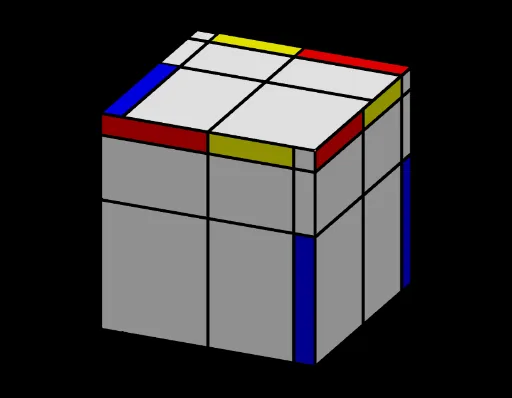
蒙德里安立方体
几何画板及绘图内容加载中,请稍等……
该范例展示了如何在立方体上绘制等边三角形、直角三角形和四边形。通过随机生成和变换点,用户可以观察这些几何图形在立方体上的分布。使用了点、交点、多边形、序列、随机数、旋转、中点、线等命令。适合初中及以上学生学习立体几何和几何作图。
GeoGebra 命令及参数
Point(yAxis) → APoint(xAxis) → CIntersect(xAxis, yAxis) → DPolygon(A, B, C, D) → poly1, a, b, c, dSequence((Random[1, 9], Random[1, 9]), i, 1, n) → listePSequence(Segment[(Element[listex, i], 0), (Element[listex, i], 10)], i, 1, n - 1) → liste1Sequence(Segment[(0, Element[listey, i]), (10, Element[listey, i])], i, 2, n) → liste2Segment(Element[listeP, n], (Element[listex, n], If[Random[1, 2] ≟ 1, 0, 10])) → eSegment(Element[listeP, 1], (If[Random[1, 2] ≟ 1, 0, 10], Element[listey, 1])) → fSort(Insert[{0, 10}, Take[listex, 1, n - 1], 1]) → listeabsSort(Insert[{0, 10}, Take[listey, 2, n], 1]) → listeordRandom(1, n) → i1Random(1, n) → j1Polygon({(Element[listeabs, i1], Element[listeord, j1]), (Element[listeabs, i1 + 1], Element[listeord, j1]), (Element[listeabs, i1 + 1], Element[listeord, j1 + 1]), (Element[listeabs, i1], Element[listeord, j1 + 1])}) → rect1RandomElement(listeC) → coul1, "Rouge"Random(1, n) → i2Random(1, n) → j2Polygon({(Element[listeabs, i2], Element[listeord, j2]), (Element[listeabs, i2 + 1], Element[listeord, j2]), (Element[listeabs, i2 + 1], Element[listeord, j2 + 1]), (Element[listeabs, i2], Element[listeord, j2 + 1])}) → rect2RandomElement(listeC) → coul2, "Jaune"Random(1, n) → i3Random(1, n) → j3Polygon({(Element[listeabs, i3], Element[listeord, j3]), (Element[listeabs, i3 + 1], Element[listeord, j3]), (Element[listeabs, i3 + 1], Element[listeord, j3 + 1]), (Element[listeabs, i3], Element[listeord, j3 + 1])}) → rect3RandomElement(listeC) → coul3, "Jaune"Rotate(A, 90°, xAxis) → A'Rotate(B, 90°, xAxis) → B'Rotate(C, 90°, xAxis) → C'Rotate(D, 90°, xAxis) → D'Polygon(A', B', C', D') → poly1', a', b', c', d'Rotate(rect1, 90°, xAxis) → rect1'Rotate(rect2, 90°, xAxis) → rect2'Rotate(rect3, 90°, xAxis) → rect3'Rotate(liste1, 90°, xAxis) → liste1'Rotate(liste2, 90°, xAxis) → liste2'Midpoint(C, A) → ELine(E, zAxis) → gSequence(Rotate[poly1', i, g], i, 0, (2 * pi), (2 * pi / 4)) → l1Sequence(Rotate[rect1', i, g], i, 0, (2 * pi), (2 * pi / 4)) → l2Sequence(Rotate[rect2', i, g], i, 0, (2 * pi), (2 * pi / 4)) → l3Sequence(Rotate[rect3', i, g], i, 0, (2 * pi), (2 * pi / 4)) → l4Sequence(Rotate[liste1', i, g], i, 0, (2 * pi), (2 * pi / 4)) → l5Sequence(Rotate[liste2', i, g], i, 0, (2 * pi), (2 * pi / 4)) → l6Rotate(seg, 90°, xAxis) → seg'Sequence(Rotate[seg', i, g], i, 0, (2 * pi), (2 * pi / 4)) → l7Point(Circle[C, Distance[D', C], Segment[D', C]]) → FCube(D', C, F) → h, G, faceFGKJ, faceHIJK, arêteD'G, arêteCD', arêteCF, arêteFG, arêteD'H, arêteGK, arêteHK, arêteHI, H, arêteCI, arêteIJ, arêteFJ, arêteJK, I, J, K, faceCD'GF, faceD'GKH, faceCD'HI, faceCFJIMidpoint(A, C) → LMidpoint(J, H) → MMidpoint(M, L) → NLine(H, I) → iRotate(rect1', 90°, i) → rect1''Rotate(rect2', 90°, i) → rect2''Rotate(rect3', 90°, i) → rect3''Rotate(liste1', 90°, i) → liste1''Rotate(seg', 90°, i) → seg''Rotate(liste2', 90°, i) → liste2''