
两种溶液混合-摩尔浓度
几何画板及绘图内容加载中,请稍等……
所属专题
Chemistry2
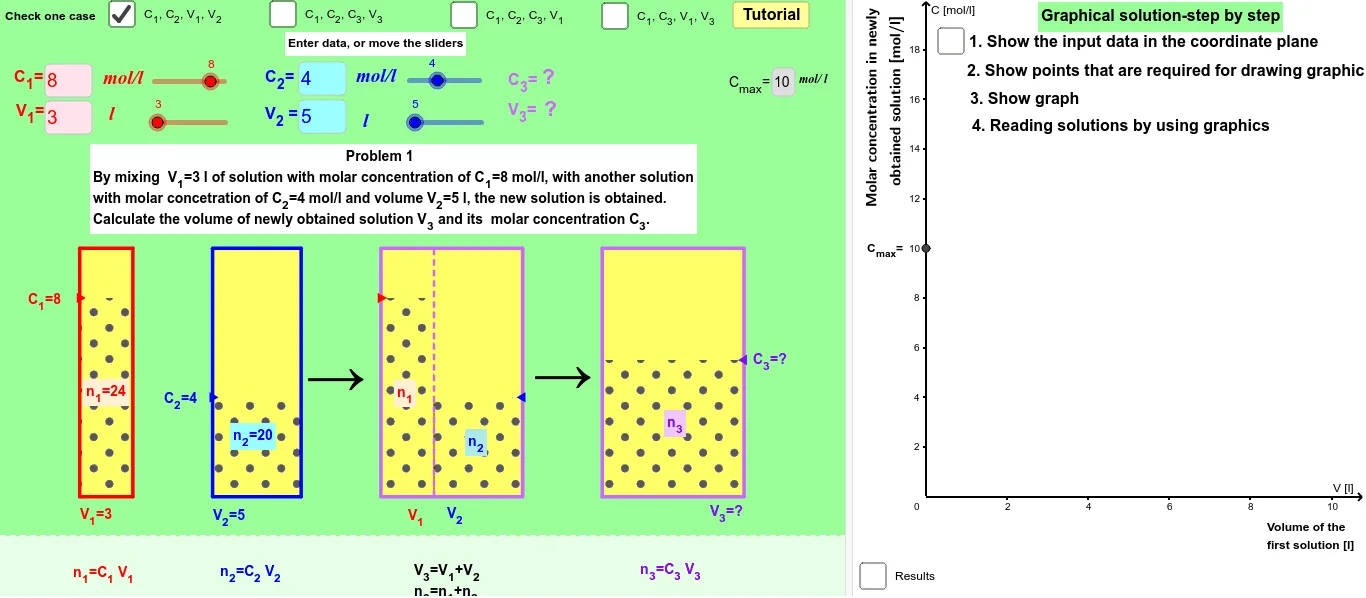
这个范例演示了两种不同摩尔浓度的溶液混合后的变化。核心数学概念包括溶液的摩尔浓度计算和混合后的浓度变化。使用了GeoGebra命令如OrthogonalLine, Segment, Textfield等进行几何作图。适合高中化学和数学课程使用。
GeoGebra 命令及参数
OrthogonalLine(G_2, e) → qSegment(A_2, C_5) → g_6Textfield(V_{11}) → inputBoxV11Textfield(C_{11}) → inputBoxC11Textfield(V_{21}) → inputBoxV21Textfield(C_{21}) → inputBoxC21Textfield(C_{13}) → inputBoxC13Textfield(C_{23}) → inputBoxC23Textfield(C_{33}) → inputBoxC33Textfield(V_{13}) → inputBoxV13Textfield(C_{14}) → inputBoxC14Textfield(C_{34}) → inputBoxC34Textfield(V_{14}) → inputBoxV14Textfield(V_{34}) → inputBoxV34Line(A_3, B_3) → fLine(A_1, C_6) → bIntersect(a, b) → B_1Sequence(k, k, 0, (2 * maxv), 1) → list1OrthogonalLine(F_3, e) → gIntersect(g, f) → C_7Line(A_2, C_5) → pIntersect(q, g_6) → B_2KeepIf(0 < x ≤ 1, list2) → list3Element(list3, 1) → elemIndexOf(elem, list2) → indexElement(list1, index) → scaleLine(B_4, C_4) → iIntersect(e, i) → A_4Segment(E_1, C_6) → b_1Segment(C_6, F_1) → c_1Segment(D_1, B_1) → a_1Segment(B_1, G_1) → d_1Segment(A_1, C_6) → g_5Segment(G_2, B_2) → d_2Segment(B_2, D_2) → a_2Segment(C_5, E_2) → b_2Line(A_3, B_3) → cSegment(C_5, F_2) → c_2Segment(G_3, B_3) → d_3Segment(D_3, B_3) → a_3Segment(E_3, C_7) → b_3Segment(C_7, F_3) → c_3Segment(G_4, B_4) → d_4Segment(B_4, D_4) → a_4Segment(F_4, C_4) → c_4Segment(C_4, E_4) → b_4Segment(A_4, C_4) → g_4Midpoint(D_2, E_2) → S_2Midpoint(D_3, E_3) → S_3Midpoint(D_4, E_4) → S_4Midpoint(D_1, E_1) → S_1VerticalText(Oy) → OyvSegment(A_3, C_7) → g_7Ray(F_3, C_7) → hMin(C_{13}, C_{23}) → min3Max(C_{13}, C_{23}) → max3VerticalText(Oy2) → text3Polygon(H_1, H_2, I_2, I_1) → polyz1, h_1, i_1, j_1, k_5Polygon(H_3, H_4, I_4, I_3) → poly1z2, n_1, o_1, p_5, q_5Polygon(H_8, H_9, I_9, I_8) → poly1z3, u_5, v_1, w_1, x_1Polygon(H_1, H_2, J_2, J_1) → poly1t1, h_2, i_2, m_1, l_1Polygon(H_3, H_4, J_4, J_3) → poly1t2, n_2, o_2, t_5, r_5Polygon(H_8, H_9, J_9, J_8) → poly1t3, u_6, v_2, z_1, y_1Polygon(H_5, H_7, I_7, I_5) → poly1, h_5, h_7, i_7, i_5Polygon(H_5, H_6, J_6, J_5) → poly2, h_3, h_6, j_6, j_5Polygon(H_6, H_7, J_7, J'_6) → poly3, h_4, h_8, j_7, j'_6Segment(H_6, I_6) → dTextfield(C_{12}) → inputBoxC12Textfield(C_{22}) → inputBoxC22Textfield(C_{32}) → inputBoxC32Textfield(V_{32}) → inputBoxV32Textfield(maxc) → inputBox1
AI 绘图提示语参考
绘制两个不同摩尔浓度溶液混合的示意图。首先画出两条表示不同浓度溶液的线段,然后通过交点表示混合过程。接着画出表示混合后溶液浓度的线段,并标注关键点和线段,最后通过交点和线段表示混合后的溶液分布。
以上提示语为根据原始绘图命令整理而来,仅供参考。