
两种溶液混合的百分比问题动态演示
几何画板及绘图内容加载中,请稍等……
所属专题
Chemistry2
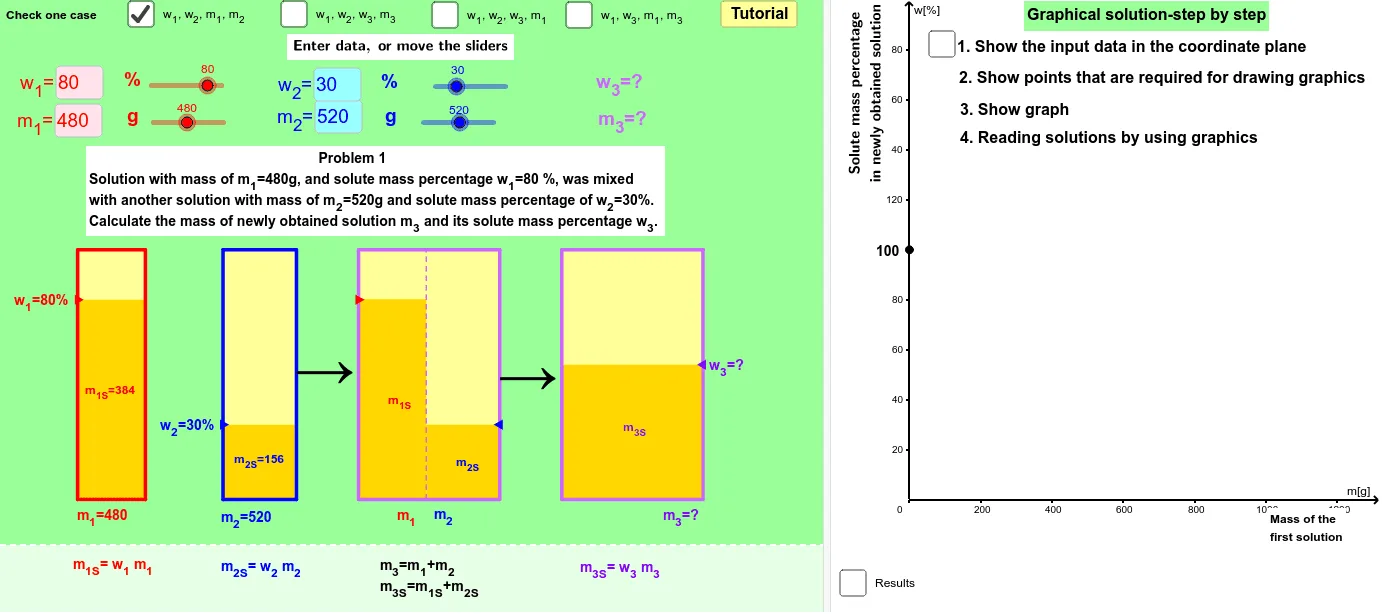
该范例通过GeoGebra动态几何环境,直观演示了两种不同浓度溶液混合后百分比变化的数学建模过程。核心数学概念涉及比例、百分比、线性关系以及函数图像,通过滑块和动态文本实时更新混合后的浓度值。作图要点包括使用OrthogonalLine、Line、Intersect等命令构造坐标轴和辅助线,利用Sequence、KeepIf、Element、IndexOf等命令处理数据列表,并通过Textfield、Segment、Midpoint、VerticalText等对象创建交互界面,最终用Polygon和Ray绘制图形区域。适合初中高年级至高中学生理解溶液混合问题,也可用于数学建模或化学跨学科教学,帮助学生将抽象的比例关系可视化。
GeoGebra 命令及参数
OrthogonalLine(G_2, l) → qLine(A_2, C_2) → pIntersect(q, p) → B_2Sequence((100 * n), n, 0, 200) → list1Line(A_3, B_3) → fIntersect(c, f) → C_3KeepIf(0 < x ≤ 100, list21) → list31Element(list31, 1) → elem1IndexOf(elem1, list21) → index1Element(list1, index1) → scaleLine(A_1, C_1) → bIntersect(a, b) → B_1Line(B_4, C_4) → iIntersect(l, i) → A_4Textfield(m_{11}) → inputBoxm11Textfield(m_{21}) → inputBoxm21Textfield(w_{21}) → inputBoxw21Textfield(w_{11}) → inputBoxw11Textfield(m_{32}) → inputBoxm32Segment(E_1, C_1) → b_1Segment(C_1, F_1) → c_1Segment(D_1, B_1) → a_1Segment(B_1, G_1) → d_1Segment(G_2, B_2) → d_2Segment(B_2, D_2) → a_2Segment(C_2, E_2) → b_2Segment(C_2, F_2) → c_2Segment(G_3, B_3) → d_3Segment(D_3, B_3) → a_3Segment(G_4, B_4) → d_4Segment(B_4, D_4) → a_4Segment(F_4, C_4) → c_4Segment(C_4, E_4) → b_4Segment(A_4, C_4) → g_4Midpoint(D_2, E_2) → S_2Midpoint(D_4, E_4) → S_4Textfield(w_{12}) → inputBoxw12Textfield(w_{22}) → inputBoxw22Textfield(w_{13}) → inputBoxw13Textfield(w_{23}) → inputBoxw23Textfield(w_{33}) → inputBoxw33Textfield(m_{13}) → inputBoxm13Textfield(w_{32}) → inputBoxw32Textfield(w_{14}) → inputBoxw14Textfield(w_{34}) → inputBoxw34Textfield(m_{14}) → inputBoxm14Textfield(m_{34}) → inputBoxm34Midpoint(D_1, E_1) → S_1VerticalText(Oy) → OyvVerticalText(text2) → text3Min(w_{13}, w_{23}) → min3Max(w_{13}, w_{23}) → max3Polygon(H_1, H_2, J_2, J_1) → poly1z1, a_5, b_5, c_5, d_5Polygon(H_1, H_2, I_2, I_1) → poly1b1, d, e, j, kMidpoint(D_3, E_3) → S_3Ray(F_3, C_3) → hPolygon(H_3, H_4, J_4, J_3) → poly1z2, n_1, o_1, t_5, r_5Polygon(H_3, H_4, I_4, I_3) → poly1b2, n_2, o_2, p_5, q_5Polygon(H_8, H_9, I_9, I_8) → poly1b3, u_5, v_1, w_5, x_1Polygon(H_8, H_9, J_9, J_8) → poly1z3, u_6, v_2, z_1, y_1Segment(F_3, C_3) → c_3Segment(C_3, E_3) → b_3OrthogonalLine(F_2, l) → gPolygon(H_5, H_7, I_7, I_5) → poly1, h_5, h_7, i_7, i_5Polygon(H_5, H_6, J_6, J_5) → poly2, h_1, h_6, j_6, j_5Polygon(H_6, H_7, J_7, J_{61}) → poly3, m, n, t_6, e_1Segment(H_6, I_6) → i_1Segment(A_3, C_3) → j_1Segment(A_1, C_1) → l_1Segment(A_2, C_2) → e_2