
坐标平面上的旋转变换探索
几何画板及绘图内容加载中,请稍等……
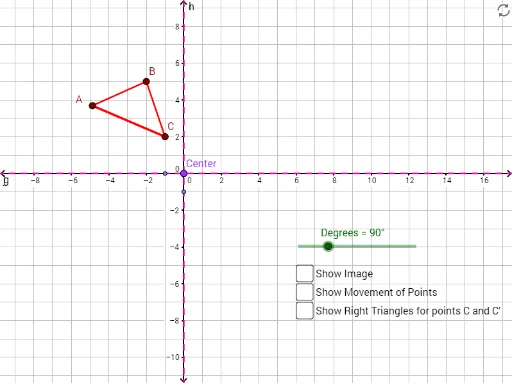
本范例演示了如何在坐标平面上进行旋转变换。通过旋转三角形或其他多边形,可以直观理解旋转的概念及其对图形的影响。涉及的核心数学概念包括旋转、坐标几何、角度和变换。作图要点使用了GeoGebra的Polygon、Rotate、CircleArc和Line等命令来创建和操作图形。适合初中及以上学生学习和理解旋转变换的性质和应用。
GeoGebra 命令及参数
Polygon(A, B, C) → poly1, c, a, bRotate(A, Degrees, Center) → A'Rotate(B, Degrees, Center) → B'Rotate(C, Degrees, Center) → C'Polygon(A', B', C') → poly1', c', a', b'CircleArc(Center, C, C') → dCircleArc(Center, B, B') → eCircleArc(Center, A, A') → fLine(D, E) → gLine(F, G) → hLine(F, G) → iLine(E, D) → jLine(Center, j) → kLine(Center, i) → lPolygon(Center, H, C) → poly2, c_1, center, h_1Rotate(Center, Degrees, Center) → Center'Rotate(H, Degrees, Center) → H'Rotate(C, Degrees, Center) → C'_1Polygon(Center', H', C'_1) → poly2', c'_1, center', h'
AI 绘图提示语参考
绘制一个三角形ABC,然后围绕一个中心点旋转这个三角形90度,生成新的三角形A'B'C'。接着画出A'、B'、C'三点构成的圆弧,连接这些圆弧的端点形成两条直线,最后画出这两条直线的平行线,确保它们通过中心点。
以上提示语为根据原始绘图命令整理而来,仅供参考。