
配方法 by Malin Christersson
几何画板及绘图内容加载中,请稍等……
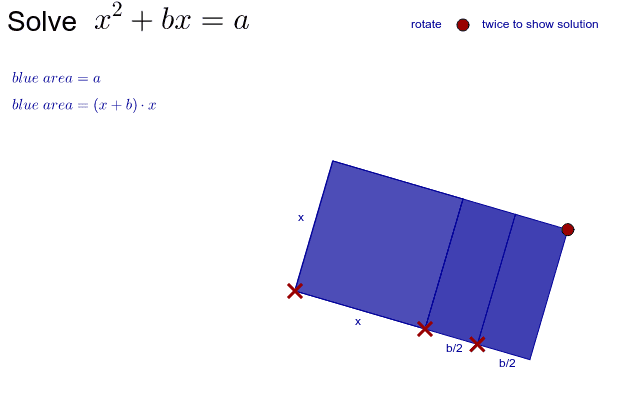
这个范例演示了如何通过配方法构造一个完整的正方形。核心数学概念包括二次项、多项式和几何作图。使用了Polygon, Circle, OrthogonalLine, Point, Ray, Intersect等GeoGebra命令。适合初中和高中学生学习二次方程和几何作图。
GeoGebra 命令及参数
Polygon(A, B, 4) → largeSquare, a, b, c, d, stopR1, stopR2Circle(stopR1, B) → largeCircleOrthogonalLine(stopR2, a) → fOrthogonalLine(stopR2, f) → hOrthogonalLine(A, f) → gPoint(g) → RayPointRay(B, RayPoint) → iPoint(i) → CCircle(B, C) → smallCircleOrthogonalLine(C, g) → jIntersect(h, j) → DCircle(D, stopR1) → kIntersect(k, h, 2) → ESemicircle(stopR1, E) → pPoint(p) → R1Line(D, R1) → mOrthogonalLine(R1, m) → nCircle(R1, Radius[largeCircle]) → rIntersect(r, n, 1) → HCircle(H, Radius[smallCircle]) → sIntersect(s, n) → G, JSemicircle(G, J) → q_1OrthogonalLine(H, n) → qIntersect(q_1, q) → K,OrthogonalLine(stopR1, a) → eOrthogonalLine(E, h) → lIntersect(l, i) → FDistance(A, B) → xLengthDistance(B, C) → halfb_1Intersect(s, q, 2) → IPolygon(B, C, D, stopR1) → poly3, b_1, c_1, d_2, stopr1Intersect(largeCircle, e, 2) → startR2CircleArc(stopR1, startR2, stopR2) → tPoint(t) → R2Line(stopR1, R2) → a_1Circle(stopR1, Radius[smallCircle]) → e_1Circle(R2, Radius[smallCircle]) → f_1OrthogonalLine(R2, a_1) → j_1OrthogonalLine(stopR1, a_1) → k_1Intersect(e_1, k_1, 1) → LIntersect(f_1, j_1, 1) → MPolygon(R2, stopR1, L, M) → rect2, k_2, stopr1_1, l_1, m_1Semicircle(stopR1, E) → p_1Intersect(p_1, j, 1) → NPolygon(stopR1, D, N, L) → smallSquare, stopr1_2, d_3, n_1, l_2Intersect(r, m) → O, PSemicircle(P, O) → r_1Intersect(r_1, n) → Q,Circle(Q, Radius[smallCircle]) → s_1OrthogonalLine(Q, n) → t_1Intersect(s_1, n) → R, SSemicircle(R, S) → c_2Intersect(c_2, t_1) → T,Polygon(D, T, Q, R1) → rect1, d_1, t_2, q_2, r1