
Zoom Tangent
Loading the math board and drawing, please wait…
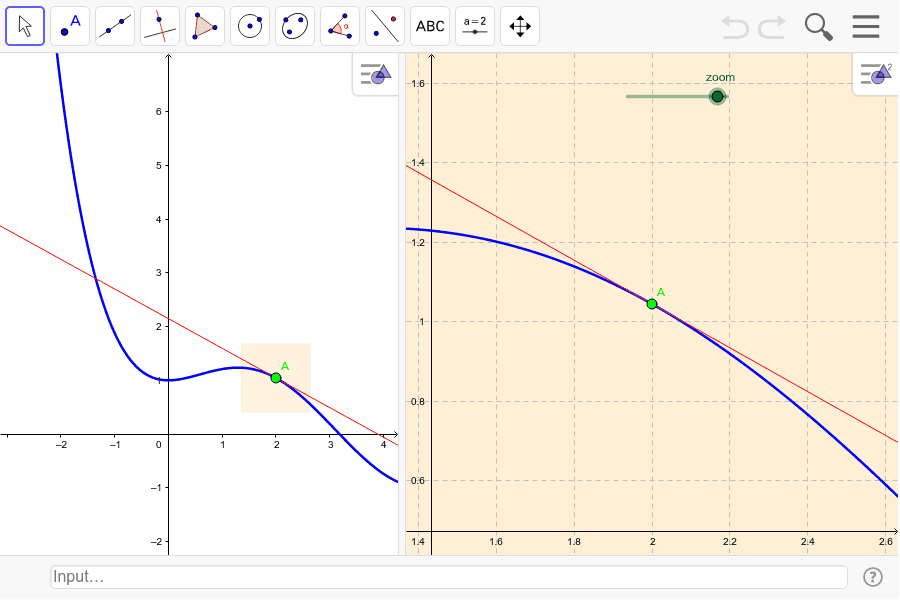
This example demonstrates zooming in to examine, in the second graphic view, part of a graph of a function and its tangent at a movable point. It involves core math concepts like Tangent Line, Intersection, Linear Equations, Logarithmic Functions, Algebra, and Derivative. Construction highlights the use of GeoGebra commands/objects such as Point, Tangent, and Polygon. Suitable for high school and above students learning about function derivatives and tangent properties.
GeoGebra Commands & Parameters
Point(f) → ATangent(A, f) → aPolygon(B, C, 4) → poly1, b, c, d, e, D, E
AI Drawing Prompt Reference
Draw a function graph and mark a movable point on it. Then, draw the tangent line at this point. In the second view, zoom in to display part of the function graph and its tangent, illustrating the relationship between the function and its derivative. Use a polygon tool to connect several points on the tangent line, forming a closed shape to highlight the geometric properties of the tangent.
The prompt above was compiled from the original drawing commands and is for reference only.