
Writing an Ellipse’s Standard Equation from Its Geometric Data
Loading the math board and drawing, please wait…
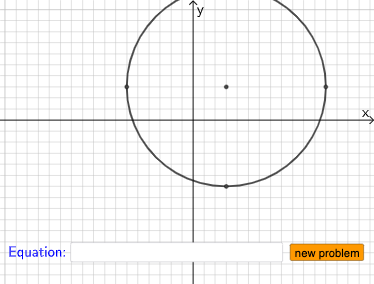
This example demonstrates how to derive and write the standard-form equation of an ellipse from its geometric elements such as the center and the characteristic dimensions (e.g., semi-major/semi-minor data and related distance/axis structure). It focuses on the mathematics of conic sections (ellipse) in coordinate geometry, emphasizing how parameters like a, b, h, k are determined and expressed in the analytic formula. The construction uses GeoGebra commands to build and verify the geometry-to-equation workflow: Point, Center, Vertex, Vector, Line, and Intersect to place the key points and axes; Distance (along with Segment and Polygon) to compute and illustrate the needed metric relationships; Angle and RotateText for auxiliary angle/text handling; Sequence, Union, If, Random, and RandomElement to vary parameters and generate multiple configurations; Textfield and Text to label parameters and display the resulting equation; and finally assemble the ellipse standard equation (e.g., eq1) so learners can connect visual features with the analytic standard form. Suitable for high-school advanced courses and early university lessons on analytic geometry, modeling, and conics.
GeoGebra Commands & Parameters
Sequence(i, i, 1, 10, 1) → l2Sequence(i, i, -10, -1, 1) → l1Union(l1, l2) → l3Point(Ray[A + (0, 1), A + (0, 2)]) → HDistance(A, H) → c_1Point(Ray[A + (1, 0), A + (2, 0)]) → EDistance(A, E) → d_1Point(Segment[(h + 1, y(C) + 10), (h + 1, y(C) - 10)]) → DLine(A, B) → fVector(A, C) → uPolygon(A, C, B) → t1, b, a_1, cSegment(A, C) → h_{1}Vector((h, 0), A) → wVector((0, 0), (h, 0)) → jDistance(A, E) → nVector(A, E) → vPoint(p) → FIntersect(eq1, q) → GPolygon(A, G, F) → t2, f_1, a_2, g_1Segment(F, A) → rSegment(A, G) → sSegment(G, F) → tAngle(A, G, F) → αRotateText(text18, pi / 2) → text20RotateText(text19, pi / 2) → text21Vector(A, H) → u_1Random(-8, 8) → e_1Random(-8, 8) → j_1RandomElement(l3) → k_1RandomElement(l3) → i_1If(e_1 < 0, (x + e_1)^(2), (x - e_1)^(2)) → p_1If(e_1 < 0, text5, e_1 > 0, text4, text9) → text8If(j_1 < 0, text7, j_1 > 0, text6, text10) → text11Center(eq2) → IVertex(eq2) → J, K, L, MTextfield(eq3) → InputBox1
AI Drawing Prompt Reference
Create a coordinate-geometry scene that links an ellipse’s geometry data to its standard equation. Start with a set of variable parameters (chosen from a small range) so multiple configurations are possible, then place a center point and construct the ellipse’s axis structure by locating characteristic points relative to the center along different directions. Use distances from the center to these points to define the key characteristic lengths, and draw the corresponding segments and connecting lines to illustrate the metric relationships. Add clear text labels for the parameters. Finally, present the ellipse’s standard-form equation derived from the used parameters, use the equation to determine important intersection points with suitable helper objects, and connect the center, intersection points, and reference points with segments; include an equation input/text display on the diagram.
The prompt above was compiled from the original drawing commands and is for reference only.