
Write Down the Coordinates
Loading the math board and drawing, please wait…
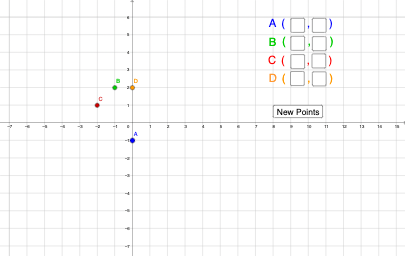
This example demonstrates how to determine the position of a point by inputting its coordinates. Key math concepts include coordinate systems and coordinate representation. It uses GeoGebra commands like Textfield, InputBox, and Text to construct. Suitable for middle school and above students learning coordinate geometry.
GeoGebra Commands & Parameters
Textfield(Ans1) → InputBox1Textfield(Bns1) → InputBox2Textfield(Cns1) → InputBox3Textfield(Dns1) → InputBox4Textfield(Ans2) → InputBox5Textfield(Bns2) → InputBox6Textfield(Cns2) → InputBox7Textfield(Dns2) → InputBox8
AI Drawing Prompt Reference
In a coordinate-geometry exercise, create input fields so a user can enter the coordinates of four points. Provide two coordinate boxes for point A (x and y), two for point B, two for point C, and two for point D, letting the positions be determined by their coordinates. Then add a second set of two coordinate boxes for A, B, C, and D as well. Construct the input boxes in sequence—first for each point’s x and y, then for the additional coordinate set for the same points.
The prompt above was compiled from the original drawing commands and is for reference only.