
Working with Linear Equations in Standard Form: Quiz Generator (V2-A)
Loading the math board and drawing, please wait…
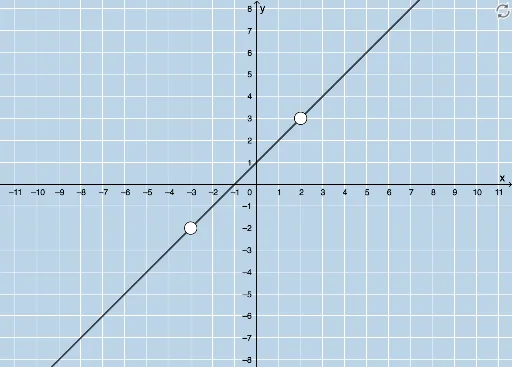
① This example demonstrates an interactive quiz generator that randomly creates linear equations in standard form (Ax+By=C) and plots their corresponding lines with integer intercepts. ② Core math concepts include the standard form of linear equations, x- and y-intercepts (both integers), graphing lines, and the relationship between algebraic equations and their geometric representations. ③ Construction highlights: using GeoGebra commands such as Random to generate integer coefficients a, b, c; LCM to ensure integer intercepts; Line to draw the graph; Point to mark intercepts; Textfield and InputBox for user input; FractionText to display intercepts as fractions; Circle and Intersect for auxiliary constructions; and buttons (button1, button2) to refresh questions and check answers. ④ Suitable for middle and high school students learning linear equations, this tool serves as a practice quiz, self-assessment, or teacher-generated exercise, reinforcing the connection between standard form equations and their graphical representations.
GeoGebra Commands & Parameters
Random(-6, 6) → aRandom(-6, 6) → bLCM(a, b) → cRandom(1, 4) → kLine(A, B) → gTextfield(h) → InputBox1Textfield(j) → InputBox2Textfield(m) → InputBox3Point(f) → CCircle(C, 2) → pIntersect(p, f, 2) → DFractionText(h) → text6
AI Drawing Prompt Reference
Create an interactive quiz graph for linear equations in standard form. Randomly generate a line whose equation is Ax+By=C with integer x- and y-intercepts. Plot the line on a coordinate plane and mark the two intercept points. Place three input boxes beside the graph for entering A, B, and C. Add a refresh button to generate a new question and a check button to verify answers. Also include a small circle centered at a point on the line with a fixed radius, intersecting the line at a marked point. Display one intercept as a fraction text. The layout should be clean and suitable for student practice.
The prompt above was compiled from the original drawing commands and is for reference only.