
Wordless Geometric Proof of the Pythagorean Theorem
Loading the math board and drawing, please wait…
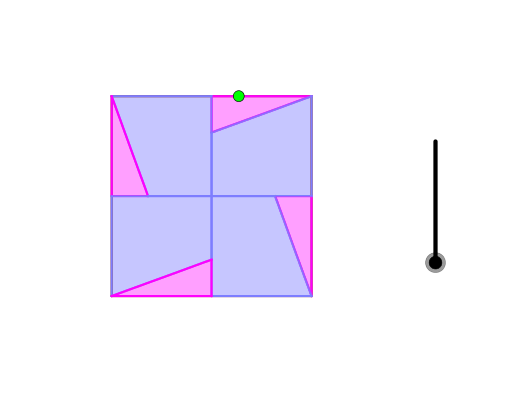
This example demonstrates a wordless, geometry-based proof of the Pythagorean Theorem by arranging and rotating pieces so that the area relationships in a right triangle become visually evident. The key mathematics includes the Pythagorean Theorem itself, right-triangle side relations, and the invariance of corresponding area under geometric placement/rotation, supported by angle and auxiliary constructions. Construction highlights from the provided GeoGebra commands and objects: Polygon to build the composite regions (e.g., poly1 and multiple labeled pieces), Point and Line to define vertices and sides, Intersect to locate key auxiliary points, OrthogonalLine to enforce the right angle, Midpoint and LineBisector for symmetry/center-based steps, Rotate to reposition pieces for the “fit” that reveals the equivalence, Circle and Angle to set directions/constraints for the construction and to verify the structure. The workflow uses many constructed points (A, B, C, D, …, I) and auxiliary variables (f, g, h, i, k, l, m, n, p, q, and several indexed intermediates) to control the layout. Suitable for secondary geometry learning, math enrichment, and learners who want an intuitive, diagram-driven understanding of why a^2+b^2=c^2 holds.
GeoGebra Commands & Parameters
Polygon(A, B, 4) → poly1, f, g, h, i, C, DPoint(Segment[C, D]) → ELine(E, B) → kIntersect(g, xAxis) → FIntersect(k, xAxis) → GIntersect(xAxis, yAxis) → HIntersect(f, yAxis) → IPolygon(B, G, F) → t1, f_1, b, g_1Polygon(I, B, G, H) → q1, i_1, b_1, g_2, h_1Line(D, C) → lOrthogonalLine(D, k) → mLine(C, B) → jOrthogonalLine(C, k) → nOrthogonalLine(D, n) → pOrthogonalLine(A, p) → qMidpoint(C, D) → JMidpoint(D, A) → KIntersect(p, xAxis) → LIntersect(n, yAxis) → MIntersect(q, yAxis) → NPolygon(J, M, C) → t2, c, j_1, m_1Polygon(M, H, F, C) → q2, m_2, h_2, f_2, c_1Polygon(H, J, D, L) → q3, h_3, j_2, d, l_1Polygon(D, K, L) → t3, l_2, d_1, k_1Polygon(K, A, N, H) → q4, k_2, a, n_1, h_4Polygon(A, I, N) → t4, n_2, a_1, i_2Intersect(m, j) → OLineBisector(D, O) → rRotate(m, 45°, D) → m'Intersect(m', r) → PCircle(H, Segment[P, D]) → eLine(A, C) → sLine(D, B) → tIntersect(e, t) → Q, RIntersect(e, s) → S, TOrthogonalLine(Q, yAxis) → q_1Circle(Q, Segment[D, L]) → e_1OrthogonalLine(Q, q_1) → p_1Intersect(e_1, p_1, 2) → ULineBisector(D, Q) → s_1LineBisector(U, L) → r_1Intersect(r_1, s_1) → VAngle(Q, V, D) → αIf(0 < o ≤ 1, Polygon[Rotate[H, ((o - 0) * (-α)), V], Rotate[J, ((o - 0) * (-α)), V], Rotate[D, ((o - 0) * (-α)), V], Rotate[L, ((o - 0) * (-α)), V]], If[o > 1, Polygon[Rotate[H, (-α), V], Rotate[J, (-α), V], Rotate[D, (-α), V], Rotate[L, (-α), V]]]) → q5Intersect(e_1, q_1, 1) → WLineBisector(Q, C) → p_2LineBisector(M, W) → q_2Intersect(p_2, q_2) → A_1Angle(C, A_1, Q) → βIf(0 < o ≤ 1, Polygon[Rotate[J, ((o - 0) * β), A_1], Rotate[M, ((o - 0) * β), A_1], Rotate[C, ((o - 0) * β), A_1]], If[o > 1, Polygon[Rotate[J, β, A_1], Rotate[M, β, A_1], Rotate[C, β, A_1]]]) → t5Rotate(q5, π / 2) → q5'Rotate(q5, π) → q5'_1Rotate(q5, (3 * π / 2)) → q5'_2Rotate(t5, π / 2) → t5'Rotate(t5, π) → t5'_1Rotate(t5, (3 * π / 2)) → t5'_2
AI Drawing Prompt Reference
Create a geometric diagram for a wordless proof of the Pythagorean theorem. Start with a square, pick a point on one side, and draw a line from that point to the opposite vertex. Use perpendiculars and intersections to form several right triangles and quadrilaterals. These pieces can be rotated around a center to reassemble into two smaller squares, visually showing that the sum of the squares of the legs equals the square of the hypotenuse. Include auxiliary circles, angle bisectors, and midpoints to control rotations precisely. Use distinct colors or shading for each region to emphasize area relationships.
The prompt above was compiled from the original drawing commands and is for reference only.