
Why Do We Call Them Conic Sections? — Visualizing Cone-Plane Intersections in Ge
Loading the math board and drawing, please wait…
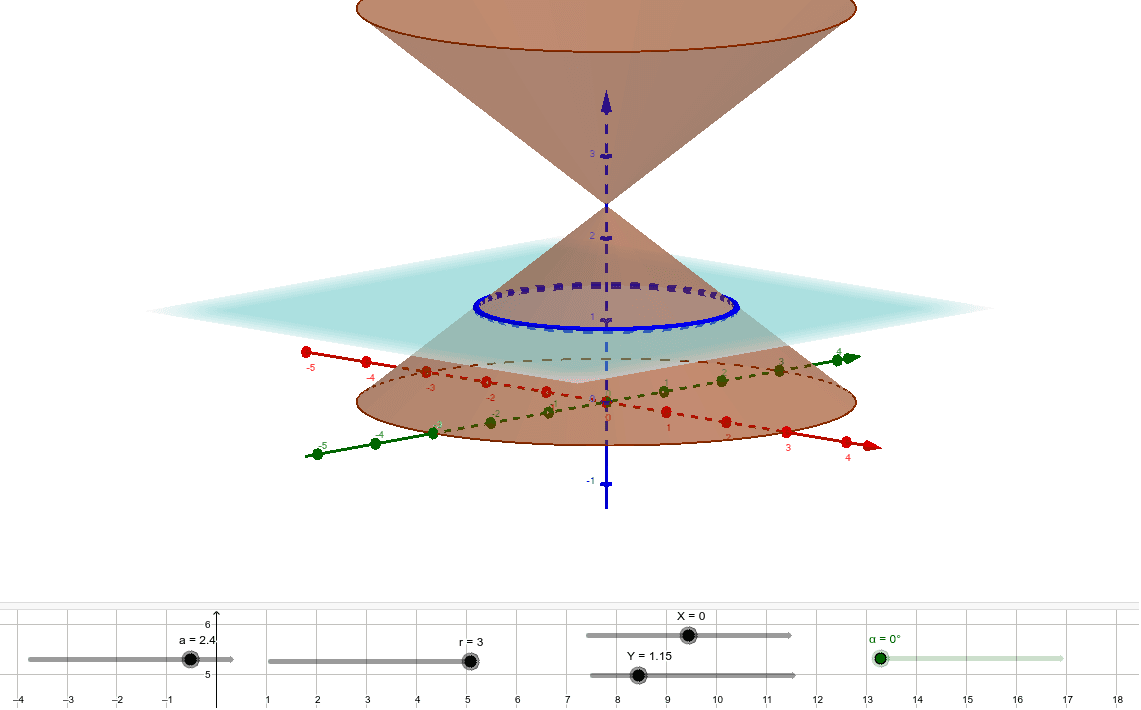
This GeoGebra example provides a dynamic 3D visualization that answers the classic question: why are these curves called conic sections? It demonstrates how a plane intersecting a cone produces different types of curves—circle, ellipse, parabola, or hyperbola—depending on the angle of the plane relative to the cone's axis. The core mathematical concepts include the cone, plane-section intersections, classification of quadratic curves, and the unified definition of conic sections. The construction uses GeoGebra commands such as Cone to create the cone, Plane to define the cutting plane, IntersectPath to compute the intersection curve, and Corner to locate key vertices. Numerous points, lines, and surfaces (A, B, C, D, E, F, G, H, K, L, M, N) and parameters (r, a, b, c, d, h) are employed to control the cone's dimensions and the plane's orientation, allowing interactive exploration. This resource is ideal for high school or early college students studying analytic geometry and solid geometry, helping them grasp the geometric origin of conic sections and deepen their understanding of ellipses, hyperbolas, and parabolas.
GeoGebra Commands & Parameters
Cone(C, A, r) → b, c, d_1Cone(B, A, r) → e, f, gPlane(F, D, E) → dIntersectPath(d, b) → hCorner(h) → G, H, K, LIntersectPath(d, e) → kCorner(k) → I, J, M, N