
Where Did the Plane Go? Three Noncollinear Points Determine a Unique Plane
Loading the math board and drawing, please wait…
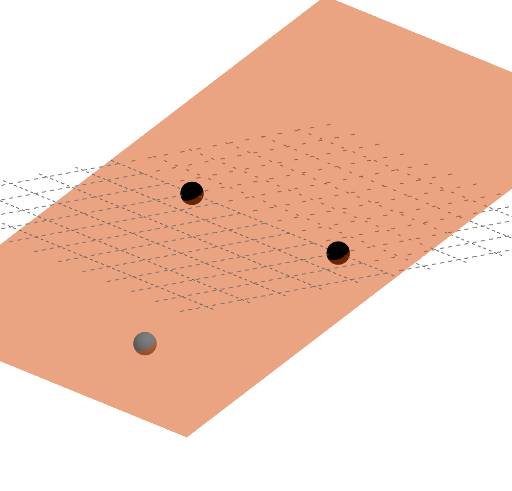
This example demonstrates how three non-collinear points uniquely determine a plane in geometry. It involves concepts such as point-line-plane relationships and plane construction. The GeoGebra commands used include Point, Line, OrthogonalLine, Plane, and Rotate to create the plane object. Suitable for middle or high school students to understand basic 3D geometry and apply geometric concepts in mathematical modeling.
GeoGebra Commands & Parameters
Point(xAxis) → BPoint(xAxis) → ALine(A, B) → fOrthogonalLine(C, f, space) → gPlane(A, C, B) → pPlane((0, 0, 0), (1, 0, 0), (1, 1, 0)) → qRotate(q, pi / 6, xAxis) → q'Rotate(q, pi / 12, xAxis) → q'_{1}Rotate(q, (3 * pi / 12), xAxis) → q'_{2}Rotate(q, (4 * pi / 12), xAxis) → q'_{3}Rotate(q, (5 * pi / 12), xAxis) → q'_{4}Rotate(q, (6 * pi / 12), xAxis) → q'_{5}Rotate(q, (7 * pi / 12), xAxis) → q'_{6}Rotate(q, (8 * pi / 12), xAxis) → q'_{7}Rotate(q, (9 * pi / 12), xAxis) → q'_{8}Rotate(q, (10 * pi / 12), xAxis) → q'_{9}Rotate(q, (11 * pi / 12), xAxis) → q'_{10}
AI Drawing Prompt Reference
In 3D space, draw a line along the X-axis, then select two arbitrary points on this line to form another line. From a third point not on this new line, draw a perpendicular line to it, which along with the previous two lines determines a plane. Next, define another plane using the origin, a point on the positive X-axis, and a unit vector along the X-axis. Rotate this plane around the X-axis six times, each time by 30 degrees, to show different perspectives of the plane.
The prompt above was compiled from the original drawing commands and is for reference only.