
Wave Equation: d'Alembert's Formula Interactive Demo
Loading the math board and drawing, please wait…
In collections
UQ-Applied Mathematical Analysis
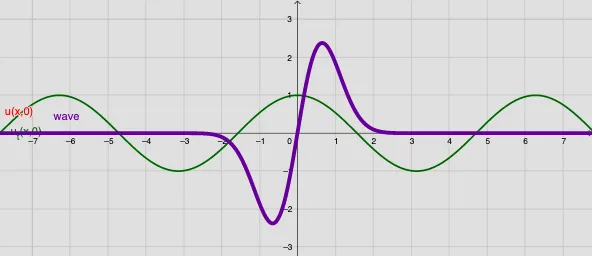
① This GeoGebra example interactively demonstrates d'Alembert's formula for the one-dimensional wave equation, showing how initial displacement and velocity profiles evolve into left- and right-traveling waves that superpose. ② Core mathematical concepts include the wave equation (a partial differential equation), d'Alembert's solution, traveling wave decomposition, initial conditions, superposition principle, and the use of integration to compute the solution. ③ Construction highlights: from the summary, the applet uses commands such as Textfield, Integral, and If, along with multiple buttons (button1-4) and sliders (speed, max, time) to control parameters. Objects include f0 and g0 (initial condition functions), f, intg (integral result), u (solution function), wave (wave plot), and input boxes InputBox1-4 for interactive modification of functions and parameters. ④ Suitable for university-level courses on partial differential equations or mathematical physics, as well as advanced high school physics, to visualize the physical meaning of d'Alembert's formula and wave propagation.
GeoGebra Commands & Parameters
Textfield(a) → InputBox3Textfield(max) → InputBox4Integral(g0, x) → intgTextfield(f0) → InputBox1Textfield(g0) → InputBox2If(intg ≟ intg, 1, 0) → test
AI Drawing Prompt Reference
Draw a one-dimensional wave equation graph to show how initial displacement and velocity evolve into left- and right-traveling waves. Input the initial displacement function f0 and initial velocity function g0 using input boxes, and calculate the integral of the initial velocity. Adjust wave speed and time with sliders to observe wave propagation and superposition.
The prompt above was compiled from the original drawing commands and is for reference only.