
Wallpaper Symmetry Group pm Demo
Loading the math board and drawing, please wait…
In collections
Wallpaper Symmetry Groups
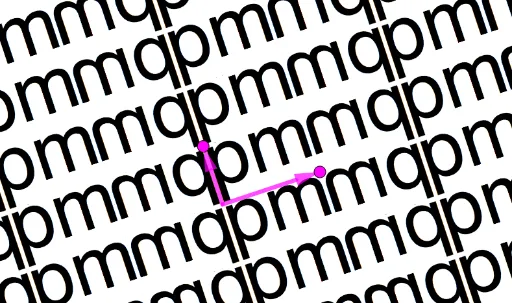
This example demonstrates the geometric transformations of the wallpaper symmetry group pm. Core mathematical concepts include symmetry, geometric transformations, and function graphs. Construction highlights the use of GeoGebra commands and objects such as Intersect (intersection), Vector (vector), OrthogonalLine (orthogonal line), Point (point), Mirror (reflection), and Sequence (sequence). Suitable for high school and above learners to understand the application of function transformations and symmetry in geometry.
GeoGebra Commands & Parameters
Intersect(xAxis, yAxis) → AVector(A, B) → uOrthogonalLine(A, u) → fPoint(f) → CVector(A, C) → vMirror(pic1, f) → pic1'Sequence(Sequence[Translate[pic1, Vector[(a * v) + ((2 * b) * u)]], a, -10, 10], b, -10, 10) → L_1Sequence(Sequence[Translate[pic1', Vector[(a * v) + ((2 * b) * u)]], a, -10, 10], b, -10, 10) → L_2
AI Drawing Prompt Reference
Create a wallpaper pattern with pm symmetry group, based on translational symmetry. Start with coordinate axes and an origin point. Draw a horizontal vector from the origin as one translation direction, and construct a line through the origin perpendicular to this vector as a mirror axis. Pick a point on the mirror axis, and connect it to the origin to form a second translation vector. Reflect a base motif across the mirror axis to get its mirrored copy. Then, translate both the original motif and its mirrored copy by integer combinations of the two translation vectors, repeating them across the plane to form a periodic tiling pattern.
The prompt above was compiled from the original drawing commands and is for reference only.