
Volume of Pyramid & Rectangular Prism by Ooi Soo Huat (2)
Loading the math board and drawing, please wait…
In collections
Mathematics Form 2
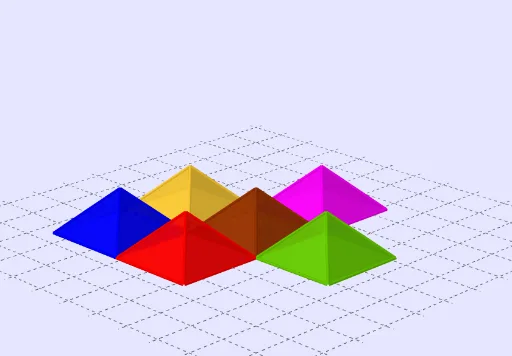
This example demonstrates the volume calculation of a pyramid and a rectangular prism. Key mathematical concepts include the volume calculation in solid geometry. Using GeoGebra commands such as Line, Vector, Intersect, etc., it illustrates how to understand volume through transformations and animations. Suitable for students at the junior high school level and above.
GeoGebra Commands & Parameters
Line(G, H) → iVector(C, A) → wMidpoint(A, B) → JLine(D, A) → nLine(C, D) → pLine(B, C) → qLine(A, B) → rMidpoint(D, A) → IMidpoint(D, C) → KMidpoint(C, B) → LVector(I, L) → uVector(K, J) → vIntersect(n, r) → ERotate(Pyramid[Translate[Polygon[A, B, C, D], v], h], (((-e_0) * 90))°, r) → e'Rotate(Pyramid[Translate[Polygon[A, B, C, D], Vector[(-v)]], h], (((-f_0) * 90))°, p) → f'Rotate(Pyramid[Translate[Polygon[A, B, C, D], Vector[(-u)]], h], (((-g_0) * 90))°, n) → g'Rotate(Pyramid[Translate[Polygon[A, B, C, D], w], h], ((h_0 * 180))°, i) → fRotate(Pyramid[Translate[Polygon[A, B, C, D], u], h], (((-i_0) * 90))°, q) → i'Rotate(Pyramid[Polygon[A, B, C, D], h], 0°, n) → jRotate(Prism[Polygon[A, B, C, D], (2 * h)], 0°, xAxis) → aSelectedIndex(Bahasa) → nn
AI Drawing Prompt Reference
Draw a pyramid and a rectangular prism. Start by drawing quadrilateral ABCD as the base. Then, draw lines from points A, B, C, and D to find midpoints J, K, L, and I, and use these to construct vectors. Next, rotate the pyramid around these vectors to create different perspectives. Finally, draw a rectangular prism with quadrilateral ABCD as its base.
The prompt above was compiled from the original drawing commands and is for reference only.