
Volume of a Vase
Loading the math board and drawing, please wait…
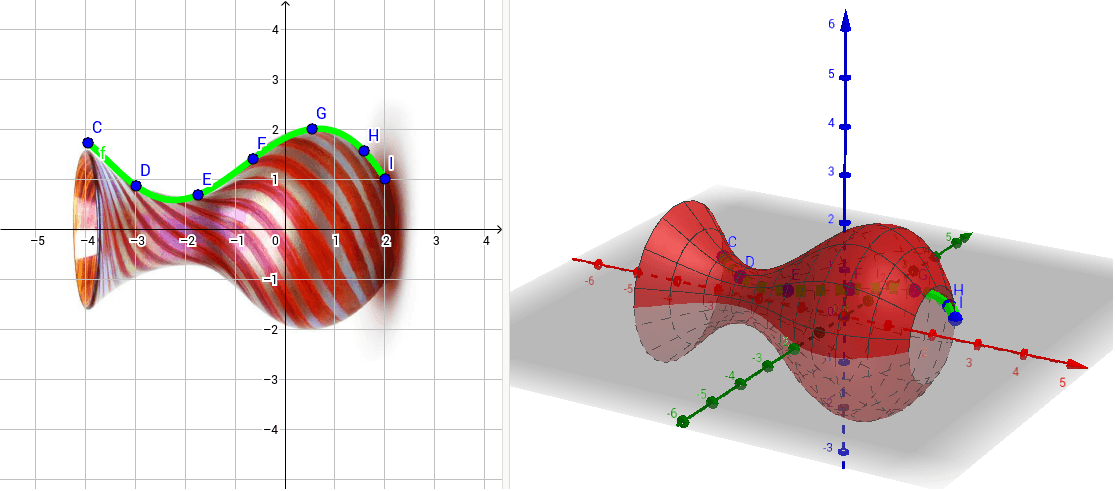
This example demonstrates how to calculate the volume of a vase using methods of solid geometry and integration. Key mathematical concepts include solid geometry and integral calculus. The Surface command is used to construct the vase's 3D shape.
GeoGebra Commands & Parameters
Surface(t, (f(t) * cos(u)), (f(t) * sin(u)), t, x(C), x(I), u, 0, (2 * π)) → a
AI Drawing Prompt Reference
Draw a 3D vase model using the given function f(t) as height, t as radius, and u as angle. First, plot the function f(t), then use the Surface command with f(t) * cos(u) as x-coordinate, f(t) * sin(u) as y-coordinate, t as z-coordinate, and u ranging from 0 to 2π, with t ranging from the vase's bottom to the top.
The prompt above was compiled from the original drawing commands and is for reference only.