
Solid with Square Cross Section and Parabola Base
Loading the math board and drawing, please wait…
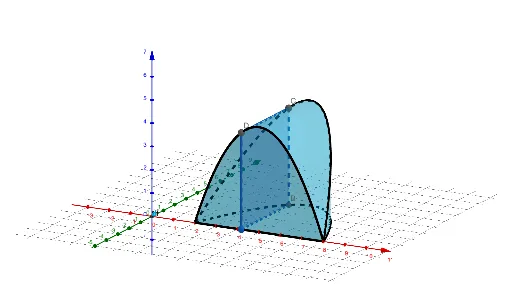
This example demonstrates a solid with a parabola base and square cross-section. Key math concepts include parabola, square, limits, solid geometry, and volume calculation. Construction highlights the use of GeoGebra commands/objects like Point, Polygon, CurveCartesian, and Surface. Suitable for high school and above students learning complex geometric solids and 3D shape construction.
GeoGebra Commands & Parameters
Point(Segment[(2, 0, 0), (8, 0, 0)]) → APolygon(A, B, 4, xAxis) → poly1, g, h, i, j, C, DCurveCartesian(t, f(t), 0, t, 2, 8) → brCurveCartesian(t, 0, 0, t, 2, 8) → bfCurveCartesian(t, f(t), f(t), t, 2, 8) → trCurveCartesian(t, 0, f(t), t, 2, 8) → tfSurface((u * tf(t)) + ((1 - u) * tr(t)), t, 2, 8, u, 0, 1) → aSurface((u * tr(t)) + ((1 - u) * br(t)), t, 2, 8, u, 0, 1) → bSurface((u * br(t)) + ((1 - u) * bf(t)), t, 2, 8, u, 0, 1) → cSurface((u * tf(t)) + ((1 - u) * bf(t)), t, 2, 8, u, 0, 1) → d
AI Drawing Prompt Reference
Create a 3D solid whose base is a parabola, defined for x ranging from 2 to 8. Form a square cross-section by taking a closed polygon in the x-axis direction, producing four vertical boundary planes for the solid. Build the necessary curve edges using a parabola for the height and additional boundary curves where the other coordinate is zero, so the parabola’s profile and the rectangle-like sides are available. Then construct several parameterized surface patches that smoothly connect the parabola-based boundary curves to the square cross-sectional edges, assembling the full solid with a parabola base and square cross-section.
The prompt above was compiled from the original drawing commands and is for reference only.