
Chapter-01 Example 1.3: Calculus and Function Graphs
Loading the math board and drawing, please wait…
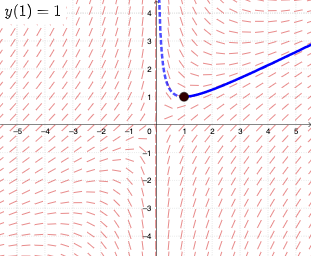
This example demonstrates how to use GeoGebra to plot slope fields and numerical integrals for differential equations. The core math concepts involved include slope fields, solving ordinary differential equations (ODEs), derivatives, integrals, and straight lines. The construction uses commands like SlopeField and SolveODE, along with objects such as function f, point A, vectors Vx and Vy, text element text1, and numerical integral objects numericalIntegral1 and numericalIntegral2. It is suitable for university calculus courses or introductory mathematical modeling.
GeoGebra Commands & Parameters
SlopeField(f, 25, 0.8) → slopefield1SolveODE(f, x(A), y(A), 5, 0.01) → numericalIntegral1SolveODE(f, x(A), y(A), -5, 0.01) → numericalIntegral2
AI Drawing Prompt Reference
Draw a slope field to show the slopes of a differential equation. The slope field consists of lines representing slopes at various points. Also include two numerical integral regions showing approximate solutions for positive and negative cases. The overall graph should clearly illustrate the relationship between the slope field and integral curves to help understand the solution of the differential equation.
The prompt above was compiled from the original drawing commands and is for reference only.