
Volume of a Square Frustum: Geometric Construction and Calculation
Loading the math board and drawing, please wait…
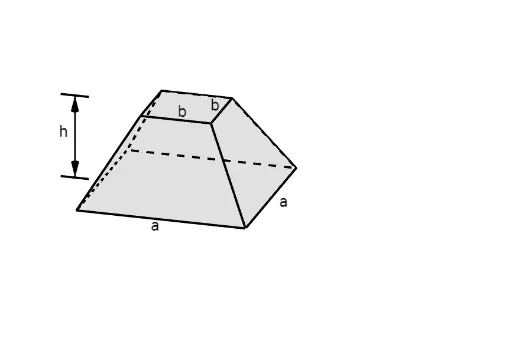
This GeoGebra example demonstrates the volume of a square frustum (a truncated square pyramid) through a dynamic 3D construction, using reflections, translations, and rotations to aid visualization. The core mathematical concepts include the frustum volume formula V = h/3 × (A1 + A2 + √(A1·A2)), similarity of triangles, symmetry, and spatial geometry involving cross-sections and projections. The construction employs GeoGebra commands such as If, Midpoint, Line, Segment, OrthogonalPlane, IntersectPath, Translate, Rotate, Mirror, Polygon, and Vector to build the top and bottom square bases and lateral faces. Key objects include points (A, B, C, D, E, F, etc.) and segments (t1, t2) that precisely control the geometry. This example is suitable for high school or early college students learning solid geometry, volume calculations, and dynamic geometry software, and it serves as an effective teaching tool for deriving the frustum volume formula.
GeoGebra Commands & Parameters
If(t2 < 0.5, (2 * t2), 1) → t2'If(t2 < 0.5, 0, (2 * (t2 - 0.5))) → t3'Midpoint(B3, B') → KMidpoint(B2, B1') → LLine(L, K) → iSegment(E, B3') → mMidpoint(m) → NOrthogonalPlane(N, m) → n_1Segment(D, B') → kMidpoint(D, B') → MOrthogonalPlane(M, k) → lIntersectPath(n_1, l) → pTranslate(Pyramid[A, D, B', C, B], Vector[(t1 * Vector[B', O])]) → eTranslate(Pyramid[A1, F, B1', E, B1], Vector[(t1 * Vector[B1', O])]) → fTranslate(Pyramid[A3, J, B3', I, B3], Vector[(t1 * Vector[B3', O])]) → gRotate(Rotate[Prism[J, B3', B3, C], (180° * t2'), i], (270° * t3'), p) → jTranslate(Pyramid[A2, G, B2', H, B2], Vector[(t1 * Vector[B2', O])]) → hMirror(p, (0, 0, 0)) → p'Rotate(Rotate[Prism[F, B1', B1, G], (180° * t2'), i], (-270° * t3'), p') → oTranslate(Prism[H, B2', B2, I], Vector[(0, 0, 0)]) → qRotate(q, 180°, zAxis) → q'Translate(Prism[B', B1', B2', B3', B], Vector[(0, 0 - 0)]) → rPolygon(B, B1, B2, B3) → q2, b_1, b1, b2, b3Segment(A, B) → sSegment(A1, B1) → tSegment(A2, B2) → f_1Segment(A3, B3) → g_1Segment(P - (0.5, 0), P - (1.5, 0)) → bPolygon(A, A1, A2, A3) → q1, a, a1, a2, a3Translate(b, Vector[(0, 0, 0), (0, 0, z(B))]) → b'Midpoint(b) → QTranslate(Q, Vector[(0, 0, 0), (0, 0, z(B))]) → Q'Vector(Q, Q') → uVector(Q', Q) → vSegment(H - (0, 1, 0), H - (0, 2, 0)) → cSegment(I - (0, 1, 0), I - (0, 2, 0)) → dVector(Midpoint[c], Midpoint[d]) → wVector(Midpoint[d], Midpoint[c]) → u_1Segment(R - (0, 1, 0), R - (0, 2, 0)) → h_1Segment(S - (0, 1, 0), S - (0, 2, 0)) → i_1Vector(Midpoint[h_1], Midpoint[i_1]) → v_1Vector(Midpoint[i_1], Midpoint[h_1]) → w_1Translate(Polygon[A, B, B3, A3], Vector[(0, 0)]) → q3Translate(Polygon[A, A1, B1, B], Vector[(0, 0)]) → q4Translate(Polygon[A1, A2, B2, B1], Vector[(0, 0)]) → q5Translate(Polygon[A2, A3, B3, B2], Vector[(0, 0)]) → q6If(t0 ≠ 0 ∧ t0 ≠ 1 ∨ t1 ≠ 0 ∧ t1 ≠ 1 ∨ t2 ≠ 0 ∧ t2 ≠ 1, false, true) → showSegment(S + (0.5, 0), S + (1.5, 0)) → j_1Segment(S + (0.5, 0), S + (1.5, 0)) → k_1Segment(T + (0.5, 0), T + (1.5, 0)) → l_1Vector(Midpoint[k_1], Midpoint[l_1]) → a_1Vector(Midpoint[l_1], Midpoint[k_1]) → c_1
AI Drawing Prompt Reference
Create a 3D geometric construction of a square frustum (truncated pyramid) with a larger square base at the bottom and a smaller square top, parallel to each other. Show the frustum divided into several prisms and pyramids through rotations, reflections, and translations to illustrate volume calculation. Include auxiliary segments, midpoints, perpendicular planes, and intersection lines to define symmetric cross-sections. Add vectors and arrows to indicate transformation directions. The overall layout should emphasize the geometric relationships and the derivation of the volume formula.
The prompt above was compiled from the original drawing commands and is for reference only.