
Volume of a Parallelogram-Based Solid with Random Experiment Statistics
Loading the math board and drawing, please wait…
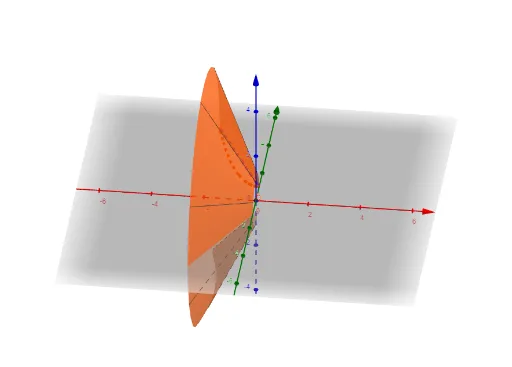
This GeoGebra example demonstrates a solid with a parallelogram base, constructed using the Intersect and Surface commands, and dynamically shows how its volume changes. Core mathematical concepts include solid geometry volume calculation, combinatorial counting, and statistical characteristics from random experiments such as mode and mean. The construction uses Intersect to find intersection curves, Surface to generate the 3D shape, and sliders n, a, b to control parameters, allowing observation of volume variation. Suitable for high school or early college students to grasp the geometric meaning of volume formulas and to verify statistical laws through random simulation, also useful for teachers demonstrating the integration of dynamic geometry and probability.
GeoGebra Commands & Parameters
Intersect(f, g) → A, BSurface(f, n, xAxis) → aSurface(g, n, xAxis) → b
AI Drawing Prompt Reference
Create a 3D solid with a parallelogram base, formed by two intersecting curves that generate smooth side surfaces. Include two adjustable sliders to control the base dimensions and height, allowing the volume to change dynamically. Display a statistical panel nearby that records volume values from repeated random experiments, highlighting the mode and mean to show the distribution. The composition should clearly illustrate the connection between solid geometry and probability, suitable for educational demonstration.
The prompt above was compiled from the original drawing commands and is for reference only.