
Volume of a Cube: Geometric Construction and Dynamic Visualization
Loading the math board and drawing, please wait…
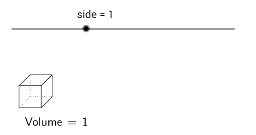
This GeoGebra example demonstrates the volume of a cube (regular hexahedron) through an interactive 3D construction, linking edge length, surface area, and volume formula. Core mathematical concepts include solid geometry volume formula (V = a³), relationships between edges and faces, and understanding internal structure via diagonals or cross-sections. Construction highlights: uses Polygon command to draw the base square, Segment command for edges, and LaTeX text to label side length and volume; objects include vertices A-H, faces poly1/poly2/poly3, edges, and a Volume object, with sliders or input boxes to dynamically adjust edge length and update volume in real time. Suitable for middle school to high school students learning volume concepts in solid geometry, also useful for teacher demonstrations or student self-exploration to build spatial intuition and connect formula derivation visually.
GeoGebra Commands & Parameters
Polygon(A, C, D, B) → poly1, a_1, c_1, d, b_1LaTeX(Volume, true, true) → text1Polygon(C, G, H, D) → poly2, c_2, g, h, d_1Polygon(D, H, F, B) → poly3, d_2, h_1, f, b_2Segment(E, G) → eSegment(E, A) → iSegment(E, F) → j
AI Drawing Prompt Reference
Draw a 3D cube with a square base and four upper vertices. Start by sketching the bottom square, then add three side faces, each formed by two edges and a diagonal, to create the visible wireframe. Connect the top center to three bottom vertices with line segments to show internal diagonals. Label the side length and volume formula beside the shape, with the volume updating dynamically as the side length changes. The overall view should emphasize spatial depth and the relationships among edges, faces, and diagonals.
The prompt above was compiled from the original drawing commands and is for reference only.