
Pyramid Surface Area Dynamic Demonstration
Loading the math board and drawing, please wait…
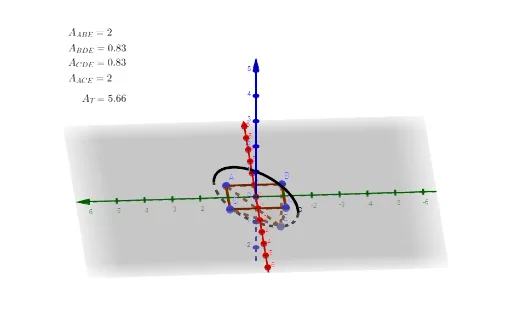
This GeoGebra example constructs a three-dimensional model of a pyramid (square-based) and dynamically illustrates the calculation of its surface area. The core mathematical concepts involve solid geometry, including the total surface area of a pyramid, areas of triangular lateral faces, base polygon area, and the use of auxiliary lines such as median lines and intersection points to define geometric elements. Construction highlights: the IntersectPath command generates the edges of the pyramid, Point defines vertices A, B, C, D, etc., and Polygon builds the base and lateral triangular faces; objects include multiple points, segments, polygons, and text labels (text1 to text5) that display area values or formulas. Suitable for upper secondary or early university students learning surface area calculations in solid geometry, and useful for teachers in classroom demonstrations or for students to explore how the surface area changes with vertex positions, deepening spatial reasoning skills.
GeoGebra Commands & Parameters
IntersectPath(a, b) → cPoint(c) → EPolygon(E, A, B) → t1, b_1, e, a_1Polygon(E, D, B) → t2, b_2, e_1, dPolygon(C, D, E) → t3, e_2, c_1, d_1Polygon(A, C, E) → t4, e_3, a_2, c_2
AI Drawing Prompt Reference
Create a 3D model of a square-based pyramid with a dynamic apex. Show the base as a square and four triangular lateral faces. Mark the base vertices and the apex. Add auxiliary lines from the apex to the midpoints of the base edges, and draw the diagonals of the base, to illustrate the heights of the lateral triangles. Display text labels near the figure showing the base area, each lateral face area, and the total surface area, with values updating as the apex moves. The visualization should clearly demonstrate the spatial relationships for calculating surface area.
The prompt above was compiled from the original drawing commands and is for reference only.