
Among Us 3D Geometry Puzzle: Equilateral Triangles and Polynomial Functions
Loading the math board and drawing, please wait…
In collections
Function Arts
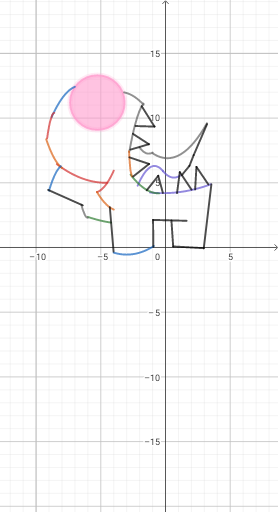
This GeoGebra example recreates the popular game character 'Among Us' as a 3D solid model, combining equilateral triangles, prisms, and polynomial function surfaces. It demonstrates how planar shapes like equilateral triangles can be extruded or revolved to form prisms, while polynomial functions define the curved contours that mimic the character's cartoonish silhouette. Core mathematical concepts include properties of equilateral triangles, volume and surface area of prisms, graphing and transformation of polynomial functions, and construction of points, segments, circles, and curves in 3D space. The construction uses basic GeoGebra commands such as Segment, Point, and Circle, with numerous labeled objects (A, B, C, D, etc.) and functions (f, g, h, etc.) to precisely position each geometric element. This example is suitable for high school or early college students, serving as an engaging introduction to solid geometry combined with function graphing, and can be used as a creative math modeling project or teaching aid to spark interest in the intersection of geometry and algebra.
GeoGebra Commands & Parameters
Segment(C, D) → fSegment(C, E) → gSegment(F, G) → hSegment(F, H) → iSegment(J, I) → jSegment(K, I) → kSegment(L, M) → lSegment(L, N) → mSegment(O, P) → nSegment(Q, P) → pSegment(R, S) → qSegment(T, S) → rSegment(U, V) → sSegment(W, Z) → tSegment(A_1, Z) → aPoint(s) → B_1Segment(B_1, A_1) → bSegment(C_1, U) → cSegment(D_1, E_1) → dSegment(F_1, G_1) → eCircle(H_1, 2.1093382307623445) → c_1Point(e) → P_1Point(e) → Q_1Point(i) → Z_1Point(h) → A_2Segment(A_2, B_2) → l_1Segment(C_2, B_2) → m_1Point(m_1) → D_2Segment(D_2, E_2) → n_1
AI Drawing Prompt Reference
Construct a 3D cartoon-like solid model built from equilateral-triangle style polygonal boundaries and piecewise prism-like structure. Start by placing several key points in space and connect them with straight segments to form multiple connected edges and face outlines (including edges derived from several base point pairs). Create additional points at specific referenced positions and use them as endpoints for further segments to complete the boundary network. At one important location, define a circular feature by drawing a circle centered at a chosen point with a given radius, and use this circle to shape a local curved outline. Finally, use polynomial-function-style curved contour behavior to guide how the curved boundaries transition between these planar polygon edges, producing an overall enclosed 3D appearance.
The prompt above was compiled from the original drawing commands and is for reference only.