
Adding Signed Numbers: Vector Demonstration on the Number Line
Loading the math board and drawing, please wait…
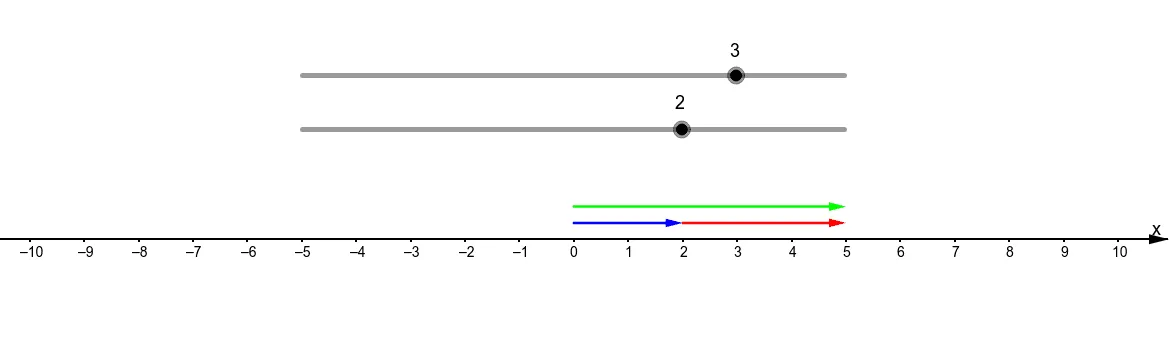
This GeoGebra example visually demonstrates the addition of signed numbers (positive and negative integers) using vectors on a number line. The core mathematical concept is the arithmetic of rational numbers, focusing on how signs and absolute values combine during addition. Construction details: Points A, B, C, D are created on the number line using the Point command, and vectors u, w, v are constructed with the Vector command. Vectors u and w represent the two addends as directed displacements (signed numbers), while vector v represents their sum. By dragging points or sliders to change the signs and magnitudes of the addends, learners observe the tip-to-tail vector addition and see how the final position reflects the rules: same signs add and keep the sign, opposite signs subtract and take the sign of the larger absolute value. This resource is ideal for middle school (Grade 7) students learning rational number operations, and serves as an interactive tool for teachers to bridge geometric intuition and algebraic rules.
GeoGebra Commands & Parameters
Point(xAxis) → BVector((0, 0.3), D + (0, 0.3)) → uVector(D + (0, 0.3), (a + b, 0.3)) → wVector((0, 0.6), (a + b, 0) + (0, 0.6)) → v
AI Drawing Prompt Reference
Visualize the addition of signed numbers on a number line using vectors, where two directed displacements (representing addends) are placed tip-to-tail, and their sum is the vector from the start of the first to the end of the second, with sliders to adjust the magnitude and sign of the addends to observe how the sum changes, demonstrating rules for adding numbers with the same or opposite signs.
The prompt above was compiled from the original drawing commands and is for reference only.