
Integer Addition Visualized
Loading the math board and drawing, please wait…
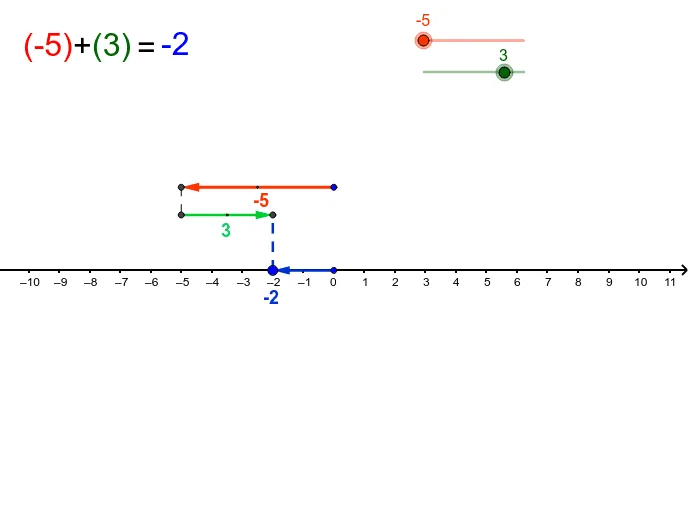
① This applet demonstrates the process of adding two integers using vectors and segments on a number line, making the abstract operation of combining positive and negative numbers visually concrete. ② The core mathematical concept is integer addition, including number line representation, vector addition, and the sign rules for positive and negative numbers. ③ Construction highlights: The applet uses GeoGebra commands such as Vector to create arrows representing the addends, Segment to draw the number line, and Midpoint to mark reference points. Key objects include a, b, C, P, u, Q, R, v, d, E, text1, text2, A, B, text3, D, w, c, text6, text7, text8, text7_1, s, and text9, with text objects displaying the equation and result. ④ This is ideal for upper elementary and middle school students learning integer operations, and for teachers to use in classroom demonstrations or for students to explore interactively by dragging sliders to change the addends and observe the sum.
GeoGebra Commands & Parameters
Vector(C, P) → uVector(Q, R) → vSegment(P, Q) → dMidpoint(Q, R) → EMidpoint(C, P) → AVector(D, B) → wSegment(B, R) → c
AI Drawing Prompt Reference
Visualize adding two integers on a number line using arrows and segments, showing the abstract operation of combining positive and negative numbers, with sliders to change addends and observe the sum, where arrows represent addends, the line segment is the number line, and key points and vector addition are highlighted.
The prompt above was compiled from the original drawing commands and is for reference only.