
Volume by Cylindrical Shells: Illustrated
Loading the math board and drawing, please wait…
In collections
surface 3D /3D-Oberflächen 1
surface 3D /3D-Oberflächen 1
BC Calculus
Calculus - Applications of Integrals - Areas and Volumes
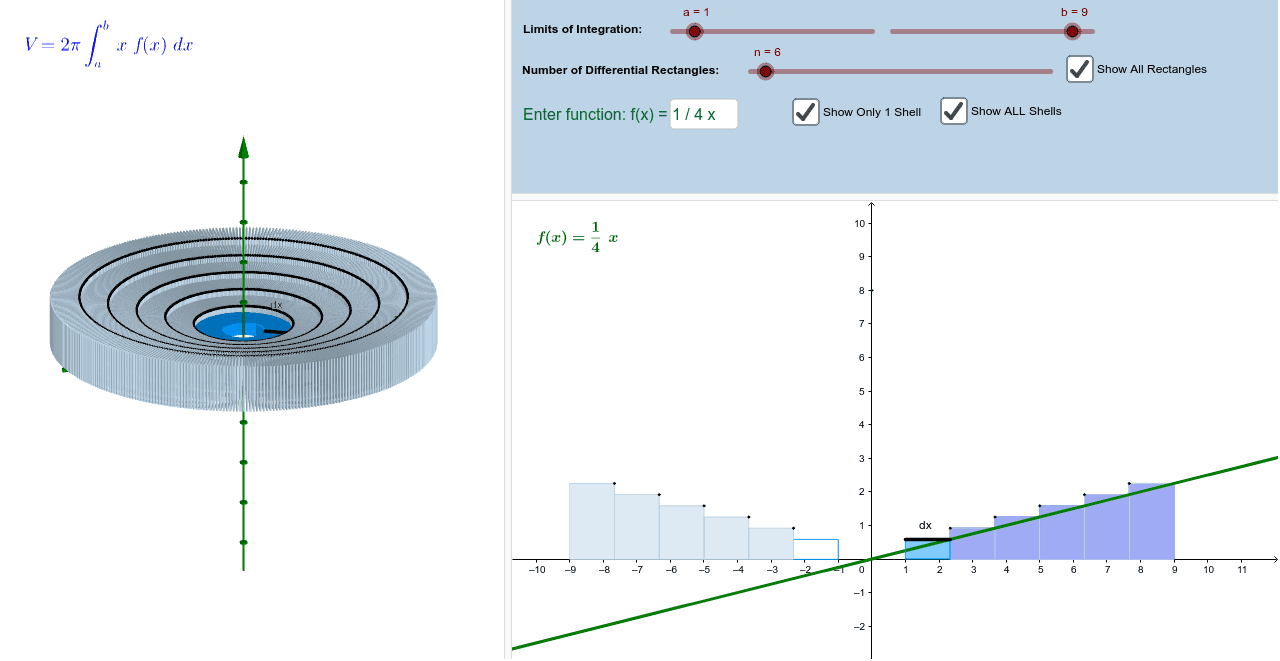
① This GeoGebra example dynamically constructs a series of cylindrical shells to visually demonstrate how the volume of a solid of revolution is computed using the cylindrical shell method. ② The core mathematical concept is the definite integral applied to volume calculation, emphasizing the limit of summing thin cylindrical shell lateral areas, involving functions, solids of revolution, integration, and the mean value theorem. ③ Construction highlights: using GeoGebra commands such as Sequence, Line, Rotate, Polygon, Distance, Point, Segment, and Textfield, the applet creates a function curve, partitions the interval, rotates segments to form shells, displays shell layers and circles, and uses a slider n to control the number of shells, showing how the total volume approaches the exact integral as n increases. ④ Suitable for upper high school or introductory college calculus, this interactive tool helps students grasp the integral formula for volumes of revolution and numerical approximation, and serves as an effective classroom demonstration or self-study resource.
GeoGebra Commands & Parameters
Sequence((a + (i * deltax), 0), i, 1, n) → list1Sequence(x(Element[list1, i]), i, 1, n) → xcoordsSequence(f(Element[xcoords, i]), i, 1, n) → list2Sequence((Element[xcoords, i], Element[list2, i]), i, 1, n) → pointsoncurveSequence((Element[xcoords, i], Element[list2, i + 1]), i, 1, n) → list3Sequence(Polygon[Element[list1, i], Element[list3, i], Element[pointsoncurve, i + 1], Element[list1, i + 1]], i, 1, n) → rectanglesLine((w, 0, 0), (w, 1, 0)) → gRotate(A, α, g) → A'Rotate(B, α, g) → B'Rotate(C, α, g) → C'Rotate(D, α, g) → D'Polygon(A', B', C', D') → poly1', a', b', c', d'Distance(g, c) → d_1Point(g) → ESequence(Rotate[poly1', β, g], β, 1*°, 359*°, 1*°) → firstshellSequence(Rotate[rectangles, β, g], β, 1*°, 360*°, 1*°) → shellsSegment(B', C') → jSequence(Rotate[list3, β, g], β, 1*°, 360*°, 1*°) → circlesTextfield(f) → InputBox1
AI Drawing Prompt Reference
Create a 3D illustration of volume by cylindrical shells. Show a function curve above the x-axis, with the interval divided into equal segments, each forming a vertical rectangle. Rotate these rectangles around the y-axis to generate a series of coaxial cylindrical shells, whose thickness decreases as the number of divisions increases. Include one rotated rectangle face with its circular path, and a rotation axis. Use a slider to adjust the number of shells, demonstrating how the total volume approaches the exact integral value.
The prompt above was compiled from the original drawing commands and is for reference only.