
Visualizing the Torus–Sphere Volume Ratio Relation
Loading the math board and drawing, please wait…
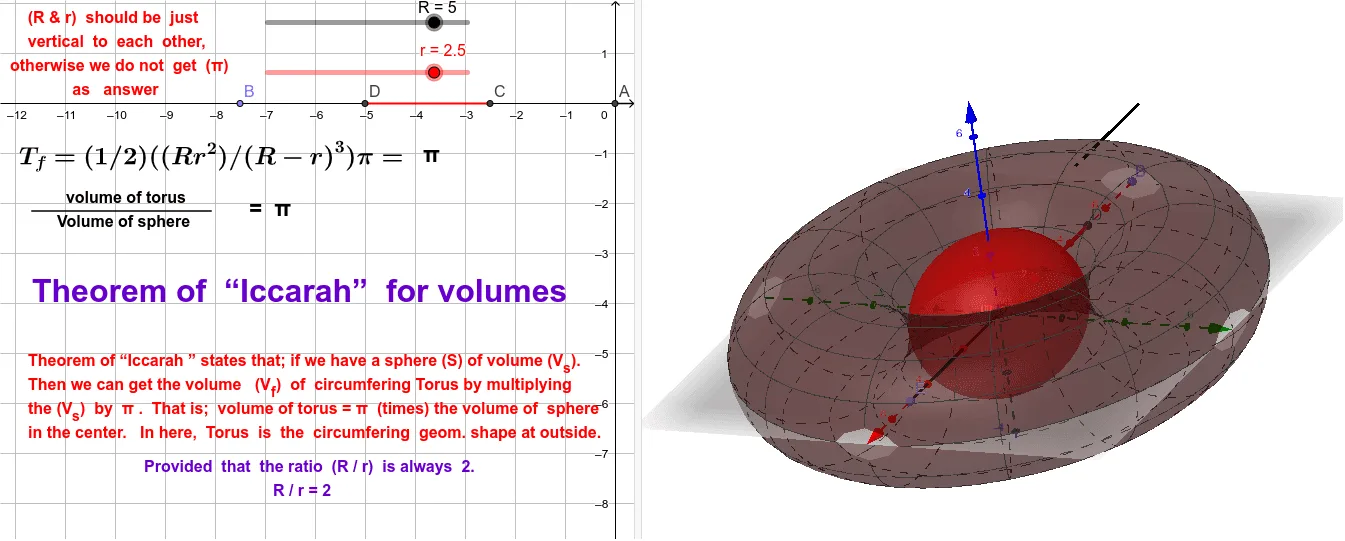
This example demonstrates how to construct and visualize a torus–sphere volume ratio relationship by using 3D geometric intersections and marked parameters in a single GeoGebra scene. The key mathematical ideas are solid geometry, intersection geometry (curves as the trace of intersecting surfaces), volume and ratio relationships, and symmetry/transform-based reasoning; it also incorporates angle parameters (e.g., theta and phi) to describe which regions are being compared, along with geometric-mean style quantities when forming the displayed relation. Construction workflow: use the command Surface to build the torus (and related surfaces), apply Intersect to obtain the intersection curves between the torus surface and the sphere/other reference geometry, create the reference sphere with Sphere, and define key points and auxiliary segments using Point, Midpoint, and Segment. The resulting objects (parameters like R, r, theta1, phi1 and multiple labeled values) support the visualization and annotation of the volume-ratio relation. Suitable for secondary-to-university geometry instruction, exploratory learning, and math visualization projects focused on deriving solid-volume relationships from geometric constructions.
GeoGebra Commands & Parameters
Surface((sin(theta) * (R + (r * cos(phi)))), (cos(theta) * (R + (r * cos(phi)))), (r * sin(phi)), theta, 0, theta1, phi, 0, phi1) → bIntersect(zAxis, yAxis) → ASphere(A, R - r) → aPoint(xAxis) → BIntersect(xAxis, a, 1) → CMidpoint(B, C) → DPoint(xAxis) → ESegment(A, E) → fSegment(D, C) → gSegment(F, G) → h
AI Drawing Prompt Reference
Create a 3D scene showing the volume ratio between a torus and a sphere. First, construct a partial torus surface using two angular parameters with specified ranges, and set major and minor radii. Place a sphere centered at the origin with radius equal to the major radius minus the minor radius, intersecting the coordinate axes. Pick two points on the x-axis, one outside and one inside the sphere, and take their midpoint. Choose another point on the x-axis, draw a segment from the origin to that point, another segment from the midpoint to the sphere intersection, and a third segment connecting two auxiliary points. These segments and points help annotate and compare the volumes.
The prompt above was compiled from the original drawing commands and is for reference only.