
Visualizing Squares from 2 to 20
Loading the math board and drawing, please wait…
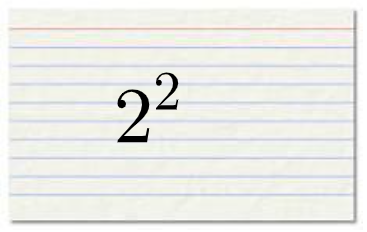
This GeoGebra example demonstrates how to visualize the sequence of square numbers from 2 to 20, making the growth and discrete structure easy to see and compare. The key concepts include sequences and series (a discrete sequence of values) and the square function as a simple but foundational building block for understanding how one quantity depends on another. The construction uses the provided commands and objects: RandomElement and Random to pick and vary elements (e.g., a, b, c, A, B, C, D, d, and related labels), Simplify to keep the computed forms clean, and on-screen objects pic1 plus text1/text2 to present or annotate the active terms or results. Designed for students learning sequences and function patterns, it works well for classroom demonstrations and exploratory learning.
GeoGebra Commands & Parameters
RandomElement(Sequence[u^(2), u, 2, 10]) → aRandomElement(Sequence[u, u, 2, 20]) → bSimplify(sqrt((a * b))) → fRandom(0, 1) → d
AI Drawing Prompt Reference
Create a visual diagram showing the sequence of square numbers from 2 to 20. Include discrete points or bars representing each integer's square value, ranging from 4 to 400, to illustrate the rapid growth of the square function. Randomly highlight one square number and annotate it with a simplified radical expression involving a product with another random integer, while using a random decimal to differentiate elements. Arrange the layout clearly to compare gaps between consecutive squares, suitable for classroom demonstration of sequences and function patterns.
The prompt above was compiled from the original drawing commands and is for reference only.