
Visualizing Skewness of a Probability Distribution
Loading the math board and drawing, please wait…
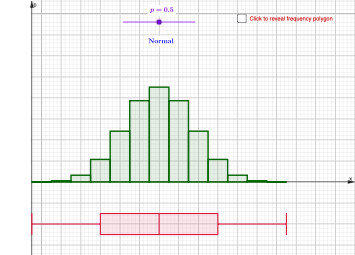
This example demonstrates how the “skewness” of a probability distribution shows up in the distribution’s shape, highlighting asymmetry and how the tail moves relative to the center. It centers on quantitative summaries such as quartiles and compares distribution behavior through both frequency plots and box-plot statistics. Key mathematical ideas include probability distributions, skewness (direction and magnitude of non-symmetry), quantiles (Q1, Median, Q3), and interpretation alongside common reference behaviors such as the normal distribution. In GeoGebra, the construction uses BinomialDist to generate an example discrete distribution, Min/Max to bound the range of values, and computes/uses objects Q1, Median, and Q3 for the central spread. The visualization combines BoxPlot for the quartile-based summary with FrequencyPolygon to show the empirical/frequency shape, using the listed commands and many intermediate objects (e.g., p, d, l1/l2/l3 and C1–C13, D10, E1–E3) to parameterize and coordinate the plots. Suitable for high-school to early university probability and statistics, especially for interactive exploration and conceptual understanding.
GeoGebra Commands & Parameters
BinomialDist(12, p) → dMin(l2) → oQ1(l2) → qMedian(l2) → rQ3(l2) → sMax(l2) → tBoxPlot(-0.1, 0.025, -0.5, LQ_1, median, LQ_3, 12.5) → uBoxPlot(-0.1, 0.025, -0.5, UQ_1, median, UQ_3, 12.5) → vFrequencyPolygon({-0.5, 0.5, 1.5, 2.5, 3.5, 4.5, 5.5, 6.5, 7.5, 8.5, 9.5, 10.5, 11.5, 12.5}, l2) → f_1
AI Drawing Prompt Reference
Create a visualization of skewness for a probability distribution. The x-axis represents values, and the y-axis shows frequency. Generate discrete data from a binomial distributionaine, then compute its minimum, first quartile, median, third quartile, and maximum. Draw two box plots: one from the lower quartile to the median, and another from the median to the upper quartile. Overlay a frequency polygon connecting the frequency points at each value to show the distribution's shape. Adjust a parameter to see how asymmetry shifts the tail relative to the center, and compare with the symmetric normal distribution.
The prompt above was compiled from the original drawing commands and is for reference only.