
Visualizing Lines of Symmetry
Loading the math board and drawing, please wait…
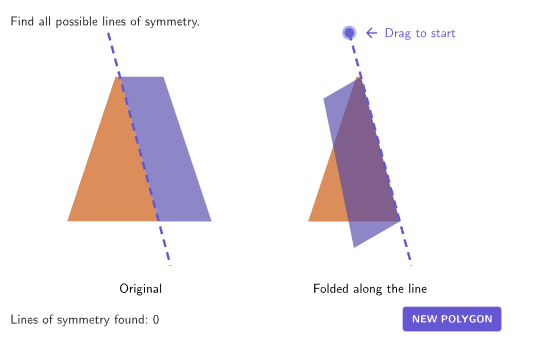
This example demonstrates how to explore symmetry in geometric figures using GeoGebra. Key mathematical concepts include symmetry, axial symmetry, and geometric transformations. Construction involves using commands like Shuffle, Mirror, Polygon, and Vector to create and verify symmetric shapes. Suitable for students in grades 4-5 to develop geometric intuition and symmetry awareness.
GeoGebra Commands & Parameters
Shuffle(Sequence[1, 11]) → randomCases, {6, 2, 10, 4, 1, 3, 11, 8, 5, 7, 9}Element(randomCases, Mod[countQuestion, Length[randomCases]] + 1) → caseNumVector((10, 0)) → vTranslateSequence(Rotate[PCenterA + (0, 5), (K * If[caseNum ≟ 2, (2 * pi / 50), pi / 24]), PCenterA], K, 0, If[caseNum ≟ 2, 49, 48]) → rotatePointsPoint(rotatePoints) → PRotateASequence(Rotate[(0, 4), (K * pi / 3), PCenter], K, 0, 5) → fig11PointsSequence(Rotate[(0, 4), ((K * 2) * pi / 5), PCenter], K, 0, 4) → fig2PointsElement(allPoints, caseNum) → currentPointsPolygon(Translate[currentPoints, vTranslate]) → translatedFigureLine(PCenterA, PRotateA) → rotationAxisIf(caseNum ≟ 2, (2 * pi / 50), pi / 24) → rotationAngleShuffle(Sequence[15]) → randomList2, {1, 9, 10, 7, 14, 6, 5, 8, 13, 4, 12, 15, 2, 11, 3}Shuffle(Sequence[20]) → randomList1, {13, 16, 14, 3, 6, 4, 2, 17, 9, 18, 1, 7, 19, 15, 12, 20, 8, 11, 5, 10}Length(found) → countCorrectPolygon(Zip[PixelsToPoint[Corner[1], Corner[3], Corner[5], A], A, {(pixelsLeft, pixelsTop), (pixelsLeft, y(Corner[5]) - pixelsBottom), Corner[5] - (pixelsRight, pixelsBottom), (x(Corner[5]) - pixelsRight, pixelsTop)}]) → borderBoxCorner(5) → layoutAppSizeonboardingTextOffset(Corner[onboardingText, 1], Corner[onboardingText, 3], onboardingCase, Corner[1], Corner[3], Corner[5]) → OnboardingTextOffsetPolygon(currentPoints) → currentFigureMirror(translatedFigure, rotationAxis) → reflectedFigureSegment(PRotateA, Mirror[PRotateA, PCenterA]) → rotationAxisDisplayCircleSector(PCenterA, PCenterA - Vector[PCenterA, PRotateA], PRotateA) → coverSectorTranslate(rotationAxisDisplay, Vector[(-vTranslate)]) → baseAxisDisplayPolygon(Translate[currentPoints, vTranslate]) → symmetricFigurecirclePixels(PRotateA, 7 + (7 * pulsing), Corner[1], Corner[3], Corner[5]) → pulsingObjectTranslate(coverSector, Vector[(-vTranslate)]) → foldedRegionBackground
AI Drawing Prompt Reference
Draw a polygon with axial symmetry. First, create a vector, then rotate points around this vector to generate the polygon. Next, use mirroring to create the symmetric figure and draw the axis of symmetry. Finally, add a rotating sector to cover part of the area, demonstrating the symmetry effect.
The prompt above was compiled from the original drawing commands and is for reference only.