
Visualizing Fraction Multiplication with Polygons and Grids
Loading the math board and drawing, please wait…
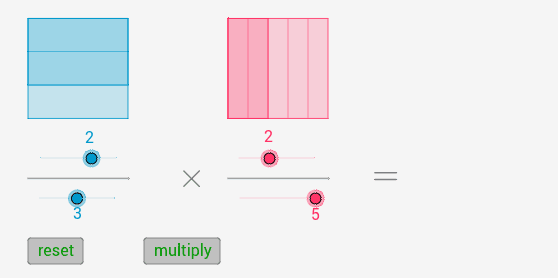
① This GeoGebra example demonstrates fraction multiplication through a visual area model, using polygons and grid partitions to show how the product of two fractions corresponds to the overlapping region in a unit square. ② Core mathematical concepts include fraction multiplication, area models, equal partitioning, and geometric transformations such as translation and vector movement. ③ Construction details: The example uses Polygon to create base shapes, Sequence to generate grid lines, Intersect to find intersection points, Segment and Vector to draw partitions, Translate to move shapes, GCD to simplify fractions, and Point to mark key vertices. Multiple polygons (poly1, poly2, poly3) are built to represent the multiplication result. ④ This is ideal for upper elementary and middle school students learning fraction operations, and serves as a valuable interactive tool for teachers to illustrate the geometric meaning of fraction multiplication.
GeoGebra Commands & Parameters
Polygon(A, B, 4) → poly1, a_1, b_1, f_2, g_2, C, DPolygon(E, F, 4) → poly2, e_1, f_1, h, i, G, HSequence(A + i * (D - A), i, 0, 1, 1 / b) → L1Sequence(B + i * (C - B), i, 0, 1, 1 / b) → L2Sequence(Segment[Element[L1, k], Element[L2, k]], k, 2, b) → L3Polygon(D, C, S, R) → poly3, d_1, c_1, s, rSequence(E + i * (F - E), i, 0, 1, 1 / d) → L4Sequence(H + i * (G - H), i, 0, 1, 1 / d) → L5Sequence(Segment[Element[L4, j], Element[L5, j]], j, 2, d) → L6Intersect(g_2, a_1) → IIntersect(b_1, a_1) → JSegment(I, J) → jIntersect(i, e_1) → KIntersect(i, h) → LPolygon(K, T, U, L) → poly4, k, t, u, lIntersect(g_2, a_1) → MIntersect(b_1, a_1) → NSegment(M, N) → mIntersect(f_2, b_1) → OIntersect(g_2, f_2) → PSegment(O, P) → nSegment(P, M) → pSegment(N, O) → qSegment(O, P) → g_1Vector(Q, V) → vTranslate(poly1, Vector[20 * e * v]) → poly1'Translate(L3, Vector[20 * e * v]) → L3'Translate(D, Vector[20 * e * v]) → D'Translate(C, Vector[20 * e * v]) → C'Translate(S, Vector[20 * e * v]) → S'Translate(R, Vector[20 * e * v]) → R'Polygon(D', C', S', R') → poly3', d', c', s', r'Translate(poly2, Vector[10 * e * v]) → poly2'Translate(K, Vector[10 * e * v]) → K'Translate(T, Vector[10 * e * v]) → T'Translate(U, Vector[10 * e * v]) → U'Translate(L, Vector[10 * e * v]) → L'Polygon(K', T', U', L') → poly4', k', t', u', l'Translate(L6, Vector[10 * e * v]) → L6'GCD(f, g) → oPoint(yAxis) → WSegment(W, Z) → h_1Segment(A_1, B_1) → i_1
AI Drawing Prompt Reference
Draw a unit square divided into a grid with equal partitions both horizontally and vertically. Place two polygons inside the square, each representing a fraction, and use the grid lines and overlapping region to show the product of the two fractions. Add segments and vectors to indicate partitions, and translate some shapes to the side for comparison. Mark key intersection points with dots, and include a reference point on the vertical axis. The layout should clearly highlight the correspondence between the overlapping area and the multiplication result.
The prompt above was compiled from the original drawing commands and is for reference only.