
Visualizing Commutative Property of Addition: Marble Jar Interactive Demo
Loading the math board and drawing, please wait…
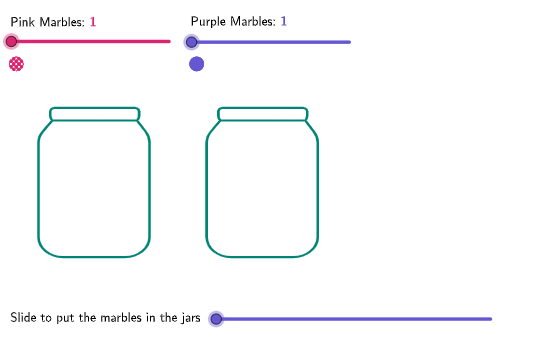
This GeoGebra worksheet demonstrates the commutative property of addition (a+b=b+a) by arranging blue and pink marbles into two transparent jars. Key math concept: commutativity of addition - swapping addends doesn't change the sum. Construction details: Uses Translate command to move marbles, Flatten to organize point coordinates, Zip to generate marble collections, If for conditional display, Corner and PointToPixels for responsive layout, and Text to show dynamic equations. Parameters like jarHeight, jarWidth, numBlue, and numPink are adjustable. Designed for grades 4-5 students learning commutative and associative properties, ideal for teachers demonstrating fundamental addition concepts.
GeoGebra Commands & Parameters
Flatten(Sequence[Sequence[Jar1Start + ((k * marbleWidth), (j * marbleWidth)), k, 0, floor(jarWidth / marbleWidth) - 2], j, 0, floor(jarHeight / marbleWidth) - 2]) → allJar1PointsTranslate(allJar1Points, Vector[Jar1Start, Jar1Start + (jarWidth + spaceBetween, 0)]) → allJar2PointsTake(allJar1Points, 1, numPink) → jar1PinkPointsTake(allJar1Points, numPink + 1, numPink + numBlue) → jar1BluePointsZip(Translate[marbleBlue, Vector[imgStart, A]], A, jar1BluePoints) → jar1MarblesBlueZip(Translate[marblePink, Vector[imgStart, A]], A, jar1PinkPoints) → jar1MarblesPinkTake(allJar2Points, numBlue + 1, numPink + numBlue) → jar2PinkPointsTake(allJar2Points, 1, numBlue) → jar2BluePointsZip(Translate[marbleBlue, Vector[imgStart, A]], A, jar2BluePoints) → jar2MarblesBlueZip(Translate[marblePink, Vector[imgStart, A]], A, jar2PinkPoints) → jar2MarblesPinkFlatten(Sequence[Sequence[pinkTopStart + ((k * marbleWidth), ((-j) * marbleWidth)), k, 0, 7], j, 0, 1]) → pinkTopPointsFlatten(Sequence[Sequence[blueTopStart + ((k * marbleWidth), ((-j) * marbleWidth)), k, 0, 7], j, 0, 1]) → blueTopPointsZip(Translate[marblePink, Vector[imgStart, A]], A, Take[pinkTopPoints, 1, numPink]) → topMarblesPinkZip(Translate[marbleBlue, Vector[imgStart, A]], A, Take[blueTopPoints, 1, numBlue]) → topMarblesBlueCorner(5) → appSizeZip(Vector[A, B], A, Take[pinkTopPoints, 1, numPink], B, jar1PinkPoints) → jar1PinkVectorsZip(Vector[A, B], A, Take[pinkTopPoints, 1, numPink], B, jar2PinkPoints) → jar2PinkVectorsZip(Vector[A, B], A, Take[blueTopPoints, 1, numBlue], B, jar1BluePoints) → jar1BlueVectorsZip(Vector[A, B], A, Take[blueTopPoints, 1, numBlue], B, jar2BluePoints) → jar2BlueVectorsIf(animateEquation ≤ 1, animateEquation, 1) → animateJar1PinkIf(animateEquation ≤ 1, 0, If[1 < animateEquation < 2, animateEquation - 1, 1]) → animateJar1BlueIf(animateEquation ≤ 2, 0, If[2 < animateEquation < 3, animateEquation - 2, 1]) → animateJar2BlueIf(animateEquation ≤ 3, 0, If[3 < animateEquation < 4, animateEquation - 3, 1]) → animateJar2PinkZip(Translate[B, A], B, topMarblesBlue, A, (animateJar1Blue * jar1BlueVectors)) → jar1BlueMarblesMovingZip(Translate[B, A], B, topMarblesPink, A, (animateJar1Pink * jar1PinkVectors)) → jar1PinkMarblesMovingZip(Translate[B, A], B, topMarblesPink, A, (animateJar2Pink * jar2PinkVectors)) → jar2PinkMarblesMovingZip(Translate[B, A], B, topMarblesBlue, A, (animateJar2Blue * jar2BlueVectors)) → jar2BlueMarblesMovingIf(animateEquation ≥ 1, (((("\textbf\textcolor{" * colorPink) * "}{") * numPink) * "}"), "") → textNum1If(animateEquation ≥ 2, (((("\textbf\textcolor{" * colorMarble2) * "}{") * numBlue) * "}"), "") → textNum2If(animateEquation ≥ 3, (((("\textbf\textcolor{" * colorMarble2) * "}{") * numBlue) * "}"), "") → textNum3If(animateEquation ≥ 4, (((("\textbf\textcolor{" * colorPink) * "}{") * numPink) * "}"), "") → textNum4If(animateEquation > 1, "\text{ + }", "") → textPlus1If(animateEquation > 3, "\text{ + }", "") → textPlus2If(animateEquation > 2, "\text{ = }", "") → textEqualText("=", pointJarStart + (jarWidth + spaceBetween / 2, jarHeight / 2), true, true, 0, 0) → textEqualsPointToPixels(Corner[1], Corner[3], Corner[5], midPoint) → midPointPixels
AI Drawing Prompt Reference
Create an interactive demo to illustrate the commutative property of addition. There are two transparent jars with different colored marbles (blue and pink). Move the marbles from one jar to another using translation and rotation, and display dynamic equations like “3 + 4 = 4 + 3”. Adjust the number of marbles and jar size to suit students of different grades.
The prompt above was compiled from the original drawing commands and is for reference only.