
Visualization of the Torus–Sphere Surface Ratio Relation
Loading the math board and drawing, please wait…
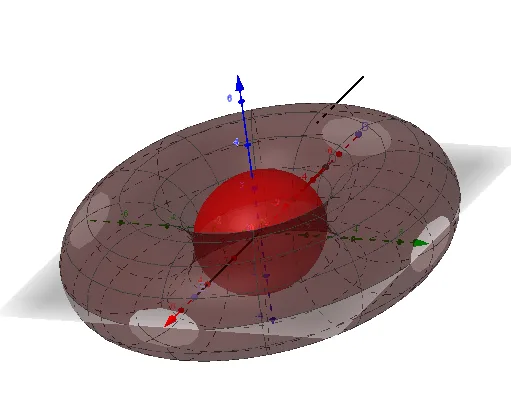
This example demonstrates how to construct and visualize a torus-related surface quantity and relate it to a sphere surface measure, establishing a surface ratio relationship using dynamic geometric measurement. Key mathematical ideas include solid geometry on curved surfaces, surface-related quantities (e.g., ratios derived from surface elements), geometric transformations/parameter-driven constructions, and the role of intersection curves in extracting the needed geometric information. Construction highlights in GeoGebra: the command Surface is used to create the involved curved surfaces, Intersect is used to compute intersection sets/curves between surfaces, Sphere generates the reference sphere, and Point, Midpoint, and Segment are used to define and annotate parameter points, midpoints, and segments that support the geometric parameterization. Objects such as R, r, theta1, phi1, b and intermediate symbolic/numeric items (e.g., A, a, B, C, D, E, f, g, T_f, and additional computed markers like F, G, h) coordinate the displayed formulas/values that underpin the ratio relation, with related integral or matrix-based display elements where appropriate. Suitable for high school advanced topics and early undergraduate instruction on 3D geometry and the visualization of calculus-linked surface computations.
GeoGebra Commands & Parameters
Surface((sin(theta) * (R + (r * cos(phi)))), (cos(theta) * (R + (r * cos(phi)))), (r * sin(phi)), theta, 0, theta1, phi, 0, phi1) → bIntersect(zAxis, yAxis) → ASphere(A, R - r) → aPoint(xAxis) → BIntersect(xAxis, a, 1) → CMidpoint(B, C) → DPoint(xAxis) → ESegment(A, E) → fSegment(D, C) → gSegment(F, G) → h
AI Drawing Prompt Reference
Draw a torus with major radius R and minor radius r. Then draw a reference sphere centered at the torus's center with radius R-r. Select two points B and E on the x-axis, and draw line segment f connecting point A (intersection of z-axis and y-axis) and point E. Draw line segment g connecting midpoint D (of B and C) and point C (intersection of x-axis and sphere a). Draw line segment h connecting points F and G.
The prompt above was compiled from the original drawing commands and is for reference only.