
Visualization of Row Vectors: Matrix Transformations
Loading the math board and drawing, please wait…
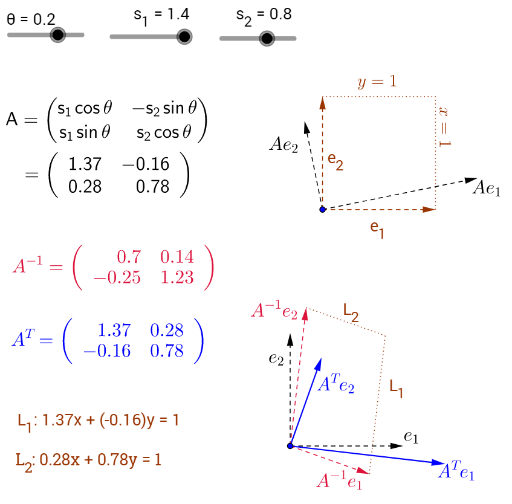
This GeoGebra example visualizes how row vectors are transformed by matrix multiplication, providing an intuitive geometric representation of linear algebra concepts. It demonstrates the action of a matrix on vectors, including unit vectors and arbitrary vectors, and shows the effect on direction and magnitude. Core mathematical concepts include row vectors, matrix multiplication, linear transformations, inverse matrices, and the relationship between determinant and area scaling. The construction uses commands such as Vector, Transpose, ApplyMatrix, Point, Segment, Translate, and Invert, with objects including vectors v1, v2, transformed vectors A'v1 and A'v2, unit vectors e1 and e2, images Ae1 and Ae2, the matrix A and its inverse Ainv, scaling factor, and level sets. Suitable for high school or undergraduate courses in linear algebra or analytic geometry, this interactive tool helps students grasp how matrices map vectors and how area changes under linear transformations.
GeoGebra Commands & Parameters
Vector(A_1, B) → e_1Vector(A_1, C) → e_2Vector(A'_1, B') → v1Vector(A'_1, C') → v2Transpose(A) → A'ApplyMatrix(A', v1) → A'v1ApplyMatrix(A', v2) → A'v2ApplyMatrix(A, e_1) → Ae_1ApplyMatrix(A, e_2) → Ae_2Point(Circle[A_1 + e_1, 1.5]) → DSegment(A_1 + e_1, A_1 + e_1 + e_2) → Levelf2Segment(A_1 + e_2, A_1 + e_1 + e_2) → Levelf1ApplyMatrix(A, pic1) → pic2Translate(pic1, Vector[A_1, A'_1]) → pic3ApplyMatrix(Invert[A], v1) → Ainv1ApplyMatrix(Invert[A], v2) → Ainv2Invert(A) → AinvSegment(A'_1 + Ainv2, A'_1 + Ainv1 + Ainv2) → A'f_{1}eq1Segment(A'_1 + Ainv1, A'_1 + Ainv1 + Ainv2) → A'f_{2}eq1