
Area of Annulus by Rearrangement
Loading the math board and drawing, please wait…
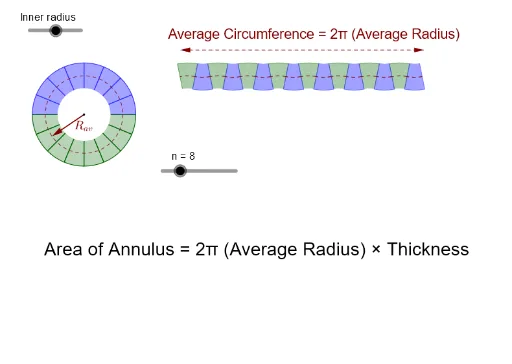
This applet visualizes the formula for the area of an annulus (ring) as the product of the average circumference and the thickness. By rearranging annular sectors into a near-rectangular shape, it demonstrates why the area equals (average circumference) × (thickness). Core mathematical concepts include the area of a circular ring, circumference, and the idea of slicing and rearranging to derive a formula, which also foreshadows integral calculus. The construction uses GeoGebra commands such as CircleSector, Sequence, Mirror, Dilate, Translate, Circle, Segment, Vector, and Point to generate and transform the sectors, along with dependent points and arcs for labeling. Suitable for middle school geometry, high school pre-calculus, or introductory calculus classes to build intuition about area formulas and integration.
GeoGebra Commands & Parameters
CircleSector((0, 0), (sin(π / ((2 * n))), cos(π / ((2 * n)))), ((-sin(π / ((2 * n)))), cos(π / ((2 * n))))) → sectorSequence(CircleSector[(-2, 0), (-2 + cos(((k - 1) * π / n)), sin(((k - 1) * π / n))), (-2 + cos((k * π / n)), sin((k * π / n)))], k, 1, n) → list3Mirror(list3, xAxis) → list3FlipSequence(Translate[sector, Vector[(0, 0), ((((1 + r) * ((2 * k) - 2)) * sin(π / ((2 * n)))), 0)]], k, 1, n) → list1Dilate(sector, r - 0.02) → sectorOpaqueSequence(Translate[sectorOpaque, Vector[(0, 0), ((((1 + r) * ((2 * k) - 2)) * sin(π / ((2 * n)))), 0)]], k, 1, n) → list1OpaqueTranslate(Mirror[list1, xAxis], Vector[((1 + r) * Vector[(0, 0), (sin(π / ((2 * n))), cos(π / ((2 * n))))])]) → list1FlipTranslate(Mirror[list1Opaque, xAxis], Vector[((1.02 + r) * Vector[(0, 0), (sin(π / ((2 * n))), cos(π / ((2 * n))))])]) → list1OpaqueFlipSequence(CircleSector[(-2, 0), (-2 + (r * cos(((k - 1) * π / n))), (r * sin(((k - 1) * π / n)))), (-2 + (r * cos((k * π / n))), (r * sin((k * π / n))))], k, 1, n) → list3OpaqueMirror(list3Opaque, xAxis) → list3OpaqueFlipCircle((-2, 0), (1 + r) / 2) → cSegment(A, B) → midVector(AA, BB) → arrowVector(BB, AA) → vDilate(CircleArc[(0, 0), (sin(π / ((2 * n))), cos(π / ((2 * n)))), ((-sin(π / ((2 * n)))), cos(π / ((2 * n))))], (1 + r) / 2) → arcSequence(Translate[arc, Vector[(0, 0), ((((1 + r) * ((2 * k) - 2)) * sin(π / ((2 * n)))), 0)]], k, 1, n) → midArcsList1Translate(Mirror[midArcsList1, xAxis], Vector[((1 + r) * Vector[(0, 0), (sin(π / ((2 * n))), cos(π / ((2 * n))))])]) → midArcsList2Point(c) → CVector(O, C) → Rav
AI Drawing Prompt Reference
Draw a visualization of the area of an annulus by rearrangement. Start with a circular sector centered at the origin, then replicate and translate it horizontally to form a row of sectors resembling a rectangle. Mirror this row across the horizontal axis and translate it to join with another set of sectors generated from an inner circle, showing the ring cut and rearranged into a near-rectangle. Add a semi-transparent inner sector group, a helper circle for the average radius, and arrows indicating thickness and average circumference. Use sliders to control the number of sectors and the ratio of radii, dynamically demonstrating that the area equals average circumference times thickness.
The prompt above was compiled from the original drawing commands and is for reference only.