
Visual Construction and Dynamic Demonstration of Triangle Area
Loading the math board and drawing, please wait…
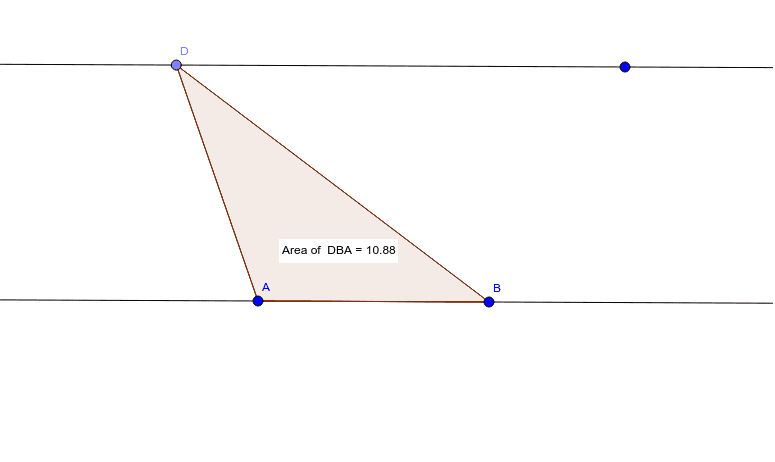
① This GeoGebra example interactively demonstrates the area of a triangle by constructing a triangle and displaying its area in real time, allowing users to drag vertices and observe how the area changes. ② Core mathematical concepts include the triangle area formula (base × height / 2), polygon area, relationships among points and segments, and dynamic geometry principles. ③ Construction details: The commands Line, Point, Segment, Polygon, and PointIn are used to create the triangle and an interior point; objects include vertices A, B, C, sides a, b, c, interior point D, polygon poly1, and text objects Textpoly1 and Pointpoly1 that display the area value and label the interior point. ④ Suitable for middle school to high school students learning plane geometry area calculations, and useful for teachers in classroom demonstrations or for students to explore how the area depends on vertex positions, fostering dynamic geometric thinking.
GeoGebra Commands & Parameters
Line(A, B) → aLine(C, a) → bPoint(b) → DSegment(A, D) → cSegment(D, B) → dSegment(B, A) → ePolygon(D, B, A) → poly1, a_1, d_1, b_1PointIn(poly1) → Pointpoly1
AI Drawing Prompt Reference
Draw a triangle ABC and connect point D inside the triangle to form sides a, b, and c. Drag points A, B, and C to change the triangle's shape and observe how the area changes. Place point D inside the triangle and connect it to A and B to form side c.
The prompt above was compiled from the original drawing commands and is for reference only.