
A Circle Inscribed in a Rhombus
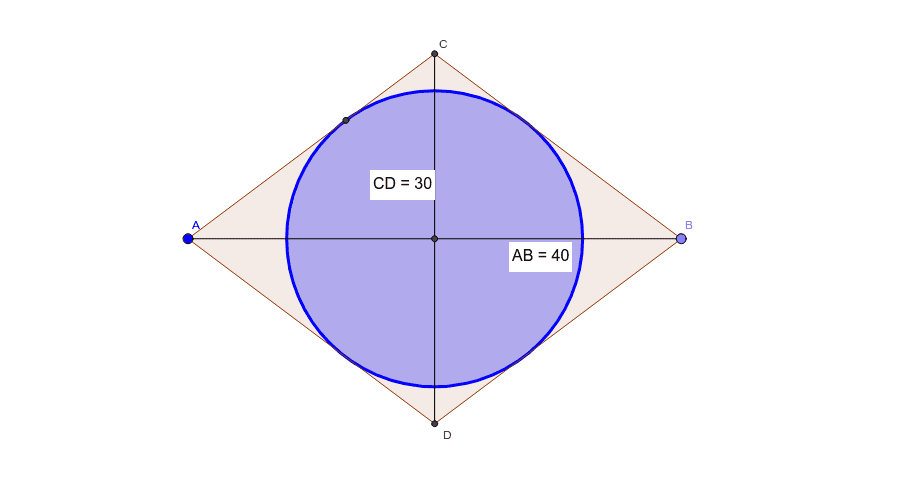
Loading the math board and drawing, please wait…
① This example demonstrates how to construct a circle inscribed in a rhombus, meaning a circle tangent to all four sides, and explores its geometric properties. ② Core mathematical concepts include the definition of a rhombus, the condition for an incircle (since diagonals of a rhombus are perpendicular and bisect each other, an incircle always exists), tangent properties of circles, and distance measurement. ③ Construction highlights: using GeoGebra commands such as Point (creating points A, B, etc.), Segment (building sides), Circle (drawing the circle), Intersect (finding intersection points), Polygon (forming the rhombus poly1), Distance (measuring side lengths and distances from center to sides), and OrthogonalLine (drawing perpendiculars) to construct the center and radius, finally verifying tangency to all sides. ④ Suitable for middle and high school geometry classes, helping students intuitively understand incircles in polygons and explore relationships between rhombus area and inradius.
GeoGebra Commands & Parameters
Point(Circle[A, 40]) → BSegment(A, B) → fCircle(A, 25) → cCircle(B, 25) → dIntersect(c, d, 1) → CIntersect(c, d, 2) → DPolygon(A, C, B, D) → poly1, a, c_1, b, d_1Segment(C, D) → gIntersect(f, g) → EDistance(C, D) → distanceCDDistance(A, B) → distanceABOrthogonalLine(E, a) → hIntersect(h, a) → FCircle(E, F) → e