
Vectors on the Unit Circle
Loading the math board and drawing, please wait…
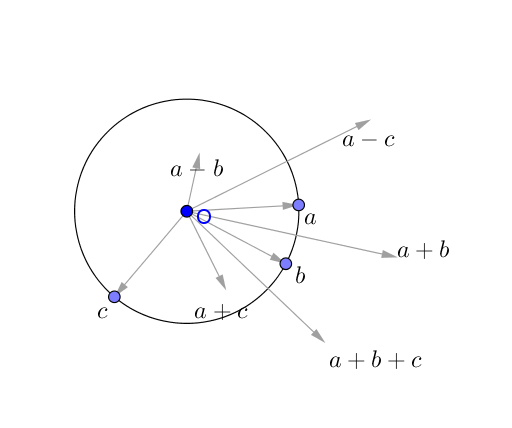
This example dynamically illustrates vector addition and subtraction on the unit circle, allowing users to drag points on the circle to observe how vectors change. Core mathematical concepts include the unit circle, vectors, vector addition/subtraction, and their geometric interpretations. Construction uses GeoGebra commands: Circle to create the unit circle, Point to place movable points on the circle, Vector to define vectors, and text objects to display coordinates or results. Suitable for high school or early college students learning vector basics, trigonometric identities, or complex number representations, and for teachers demonstrating vector operations visually.
GeoGebra Commands & Parameters
Circle(O, 1) → cPoint(c) → APoint(c) → BPoint(c) → CVector(O, A) → uVector(O, B) → vVector(O, C) → w
AI Drawing Prompt Reference
Draw a unit circle centered at the origin. Place three movable points on the circle, each marked with a distinct color. From the center, draw three vectors pointing to these points, representing three unit vectors. The figure should dynamically show how the vectors change as the points move along the circle, and visually illustrate vector addition and subtraction. Display coordinates or vector components near the points to aid understanding of trigonometric and geometric interpretations. Keep the layout clear for educational demonstration.
The prompt above was compiled from the original drawing commands and is for reference only.