
Asymmetric Propeller: Dynamic Geometry with Similar Triangles
Loading the math board and drawing, please wait…
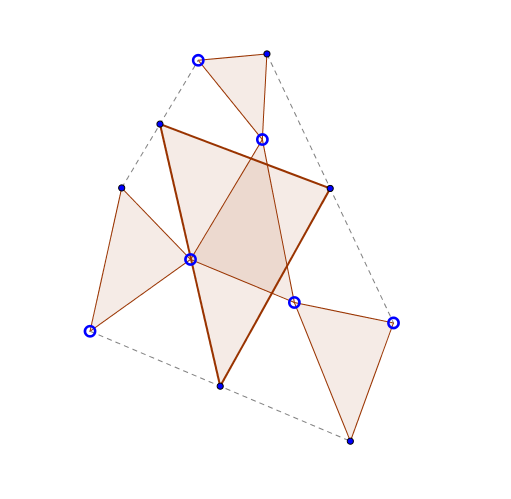
This GeoGebra example demonstrates an asymmetric propeller-like figure formed by rotating and intersecting multiple triangles. It illustrates the properties of similar triangles, rotation transformations, and proportional relationships. The construction uses commands such as Polygon, Rotate, Ray, Intersect, Midpoint, and Segment to build a complex nested structure. Key objects include multiple triangles, circles, and intersection points. This is suitable for middle and high school geometry classes to explore similarity, symmetry, and step-by-step geometric construction.
GeoGebra Commands & Parameters
Polygon(A, B, C) → poly1, c, a, bRotate(D, (-Angle[B, A, C]), A) → D'Ray(A, D') → fRotate(A, Angle[A, C, B], D) → A'Ray(D, A') → gIntersect(f, g) → EPolygon(D, E, A) → poly2, a_1, d, eRotate(F, (-Angle[C, B, A]), B) → F'Ray(B, F') → iRotate(B, Angle[B, A, C], F) → B'Ray(F, B') → jIntersect(i, j) → GPolygon(B, G, F) → poly3, f_1, b_1, g_1Rotate(H, (-Angle[A, C, B]), C) → H'Ray(C, H') → hRotate(C, Angle[C, B, A], H) → C'Ray(H, C') → kIntersect(h, k) → IPolygon(C, H, I) → poly4, i_1, c_1, h_1Midpoint(E, H) → JMidpoint(D, G) → KMidpoint(F, I) → LPolygon(K, J, L) → poly5, l, k_1, j_1Segment(G, D) → mSegment(F, I) → nSegment(E, H) → p
AI Drawing Prompt Reference
Draw an asymmetric propeller shape composed of multiple similar triangles. Start by drawing triangle ABC, then rotate triangle D around point A to generate ray f. Next, rotate point A around point D to generate ray g, and their intersection point is E, forming triangle ADE. Repeat this process, rotating around points B and C to generate triangles BGF and CHI. Finally, connect the midpoints of segments EH, DG, and FI to form triangle JKL.
The prompt above was compiled from the original drawing commands and is for reference only.