
Vectors: Magnitude & Direction (I)
Loading the math board and drawing, please wait…
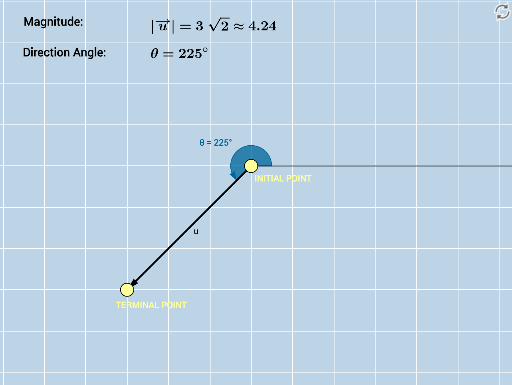
This GeoGebra example demonstrates the visual representation of a vector's magnitude (length) and direction (angle) in a 2D plane, serving as an introductory exploration for learners. The core mathematical concepts include vector definition, magnitude calculation via the Pythagorean theorem, direction angle relative to the positive x-axis, and connections to geometric elements like triangles and circles. Construction details: the Vector command creates vector u, Angle measures the direction θ, Length computes the magnitude, Distance obtains the distance between points, Ray constructs a ray to illustrate direction, SurdText displays exact lengths in radical form, and multiple text objects (text1 to text5) annotate values and explanations. This resource is suitable for high school or pre-university mathematics instruction, ideal for dynamic demonstrations in introductory vector lessons and for student-led exploration of how magnitude and direction change as endpoints vary.
GeoGebra Commands & Parameters
Vector(A, B) → uAngle(D, A, B) → θLength(u) → aSurdText(a) → text1Distance(A, B) → distanceABRay(A, D) → g
AI Drawing Prompt Reference
Draw a vector from point A to point B, showing its length and direction angle. Calculate the length and display it in radical form, and draw a ray from point A to illustrate the direction.
The prompt above was compiled from the original drawing commands and is for reference only.