
Vectors and Components Practice
Loading the math board and drawing, please wait…
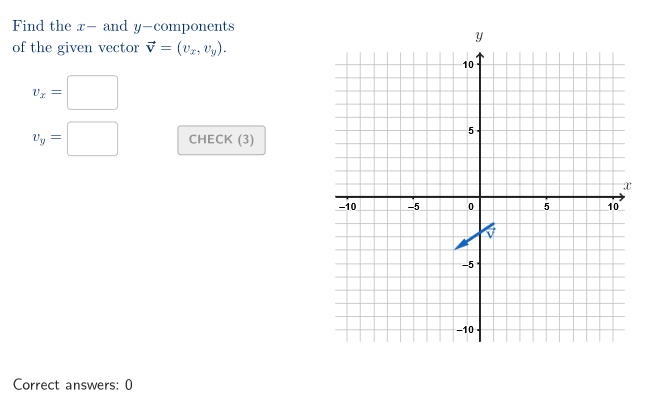
This example demonstrates how to find vector components through an interactive test. Core math concepts include vector decomposition, coordinate geometry, and the Pythagorean theorem. It is constructed using commands like Shuffle, Element, Textfield, Corner, onboardingTextOffset, Polygon, Segment, Vector, Translate, and involves objects such as countQuestion, allCaseNum, allCompX, allCompY, etc. Suitable for high school students learning vectors and analytical geometry.
GeoGebra Commands & Parameters
Shuffle({1, 2, 3, 4, 5, 6, 7}) → allCaseNum, {6, 7, 5, 1, 2, 3, 4}Shuffle(Sequence[t, t, -6, 6, 1] \ {-1, 1}) → allCompX, {-3, -4, -2, -5, 3, 6, 2, -6, 5, 4, 0}Shuffle(Sequence[t, t, -6, 6, 1] \ {0, -1, 1}) → allCompY, {-2, -4, -5, 2, -6, 5, 6, 4, -3, 3}Shuffle(Join[Sequence[Sequence[(j, k), j, -4, 4, 1], k, -4, 4, 1]]) → startGrid, {(1, -2), (-4, 3), (-2, -3), (-3, 1), (-4, -3), (-2, -1), (-2, 2), (4, 0), (-3, 3), (2, 1), (-1, -3), (1, 1), (4, -4), (2, -3), (2, 0), (0, 3), (-2, -4), (0, 2), (-1, -4), (-3, -3), (-2, -2), (3, 2), (1, 0), (4, -3), (0, 0), (0, -2), (-4, 4), (2, -4), (-1, -1), (3, 0), (-1, 0), (0, -3), (2, -2), (4, -1), (-1, 1), (-1, 3), (3, 1), (-4, 1), (3, -3), (4, 1), (1, -1), (1, 3), (1, -4), (-4, 2), (4, 2), (-1, 2), (1, 4), (-1, -2), (-3, -1), (-2, 0), (2, 2), (4, -2), (-2, 3), (2, 3), (-4, -2), (-4, -4), (2, -1), (3, -2), (3, -4), (-3, 0), (4, 3), (-3, -4), (1, 2), (0, 1), (4, 4), (-3, -2), (0, -1), (-1, 4), (0, -4), (-2, 4), (3, 3), (2, 4), (-3, 4), (-4, 0), (-4, -1), (-2, 1), (3, 4), (-3, 2), (3, -1), (1, -3), (0, 4)}Element(allCaseNum, Mod[countQuestion, Length[allCaseNum]] + 1) → caseNumElement(allCompX, Mod[countQuestion, Length[allCompX]] + 1) → compXElement(allCompY, Mod[countQuestion, Length[allCompY]] + 1) → compYElement(startGrid, Mod[countQuestion, Length[startGrid]] + 1) → V1Textfield(inputB) → InputBoxBCorner(5) → layoutAppSizeonboardingTextOffset(Corner[onboardingText, 1], Corner[onboardingText, 3], onboardingCase, Corner[1], Corner[3], Corner[5]) → OnboardingTextOffsetTextfield(inputA) → InputBoxATextfield(inputC) → InputBoxCPolygon(P1, Mirror[P1, yAxis], Mirror[P1, (0, 0)], Mirror[P1, xAxis]) → peep, p1, f, g, hSegment((-10.8, 0), (10.8, 0)) → fakeXSegment((0, -10.8), (0, 10.8)) → fakeYVector(V1, V2) → givenVecVector(V1, (0, 0)) → aniVecTranslate(V1, Vector[(aniSli * aniVec)]) → V1TTranslate(V2, Vector[(aniSli * aniVec)]) → V2TVector(V1T, V2T) → transVecSegment(V2T, (0, y(V2T))) → projYSegment(V2T, (x(V2T), 0)) → projXSegment((compX, 0), (0, 0)) → segmXSegment((0, compY), (0, 0)) → segmY
AI Drawing Prompt Reference
Draw a vector in a coordinate system with a random endpoint, and display its x and y components. Start by drawing the coordinate axes, then randomly select a point as the vector's endpoint and draw the vector. Next, draw perpendicular lines from the vector's endpoint to the x-axis and y-axis, marking the intersections as the endpoints of the x and y components. Finally, draw the x and y components and label their lengths.
The prompt above was compiled from the original drawing commands and is for reference only.