
Vector Product Demo
Loading the math board and drawing, please wait…
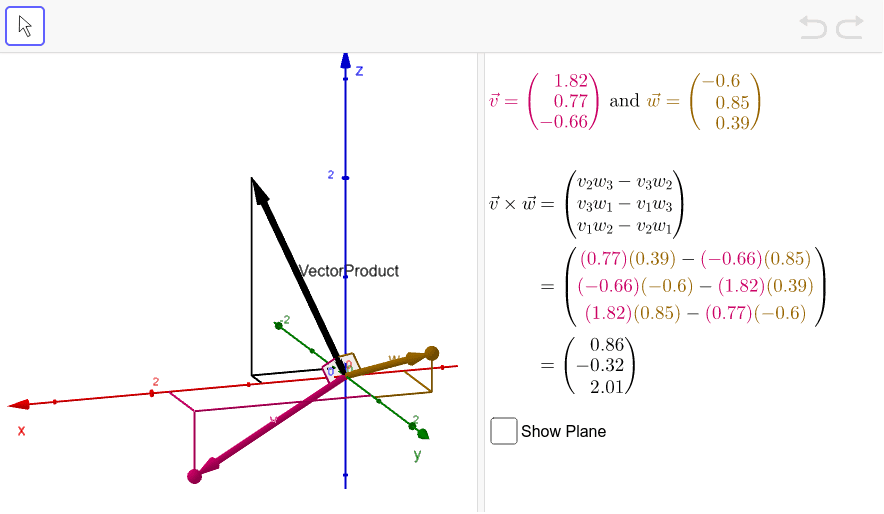
This example demonstrates the vector product (cross product) of two vectors in 3D space, including its geometric interpretation, magnitude calculation, and direction determination. Key math concepts involve vector product definition, properties, and applications. GeoGebra commands like Vector, Plane, OrthogonalLine, Intersect, Segment, and Angle are used to construct vectors, planes, perpendicular lines, and intersection points. Suitable for high school and above students learning vector algebra, solid geometry, and linear algebra.
GeoGebra Commands & Parameters
Vector((0, 0, 0), A) → vVector((0, 0, 0), B) → wPlane((0, 0, 0), A, B) → aOrthogonalLine(C, xAxis, xOyPlane) → bOrthogonalLine(C, yAxis, xOyPlane) → cOrthogonalLine(D, yAxis, xOyPlane) → dOrthogonalLine(D, xAxis, xOyPlane) → eIntersect(b, xAxis) → EIntersect(c, yAxis) → FIntersect(d, yAxis) → GIntersect(e, xAxis) → HSegment(C, E) → v_xSegment(C, F) → v_ySegment(D, G) → w_ySegment(D, H) → w_xSegment(C, A) → v_zSegment(D, B) → w_zOrthogonalLine(I, xAxis, xOyPlane) → lOrthogonalLine(I, yAxis, xOyPlane) → mIntersect(l, xAxis) → JIntersect(m, yAxis) → KSegment(I, J) → u_xSegment(I, K) → u_ySegment(I, L) → u_zAngle(A, M, L) → αAngle(B, M, L) → β
AI Drawing Prompt Reference
In 3D space, draw two vectors from the origin and construct the plane spanned by them. From the endpoints of each vector, drop perpendiculars to the coordinate axes, marking the feet and connecting them with segments to show the vector components. Then take another point, drop perpendiculars to the axes, and draw its component segments. Finally, measure two angles between each vector and a reference line in the plane to illustrate the cross product geometry.
The prompt above was compiled from the original drawing commands and is for reference only.