
Vector Operations and Geometric Construction
Loading the math board and drawing, please wait…
In collections
MTH-5173-2-St. Lawrence Seaway
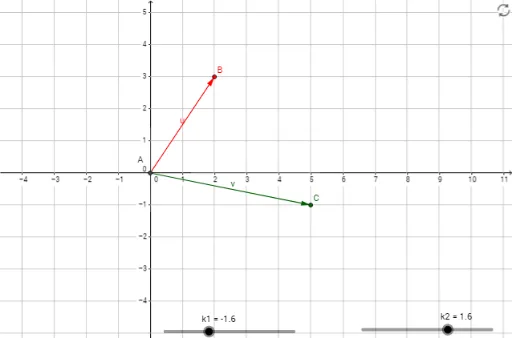
①This GeoGebra example dynamically demonstrates basic vector operations (such as addition, scalar multiplication, or dot product) and their visual effects in plane geometry, involving two vectors u and v, along with intersection points and a general quadrilateral structure. ②Core mathematical concepts include linear operations on 2D vectors, collinearity and perpendicularity, applications of vectors in geometric figures (e.g., general quadrilaterals), and connections to complex number representation on the plane. ③Construction highlights: using the Intersect command to find intersection points of lines or curves, the Vector command to create vector objects, and setting points A, B, C and vectors u, v as fundamental elements, allowing interactive dragging to observe changes in operation results. ④Suitable for high school or early college mathematics instruction, ideal for classroom demonstrations or student self-exploration in vector chapters, helping to understand the geometric meaning and coordinate representation of vector operations.
GeoGebra Commands & Parameters
Intersect(xAxis, yAxis) → AVector(A, B) → uVector(A, C) → v
AI Drawing Prompt Reference
Draw two vectors starting from the origin pointing to different points, and display their intersection point. Perform vector addition, scalar multiplication, and dot product on these vectors, and visualize the results as vectors. Also, draw a quadrilateral formed by the endpoints of these vectors and the origin, demonstrating the application of vectors in geometric figures. Allow dragging the endpoints of the vectors to observe changes in the operation results and the shape of the quadrilateral.
The prompt above was compiled from the original drawing commands and is for reference only.